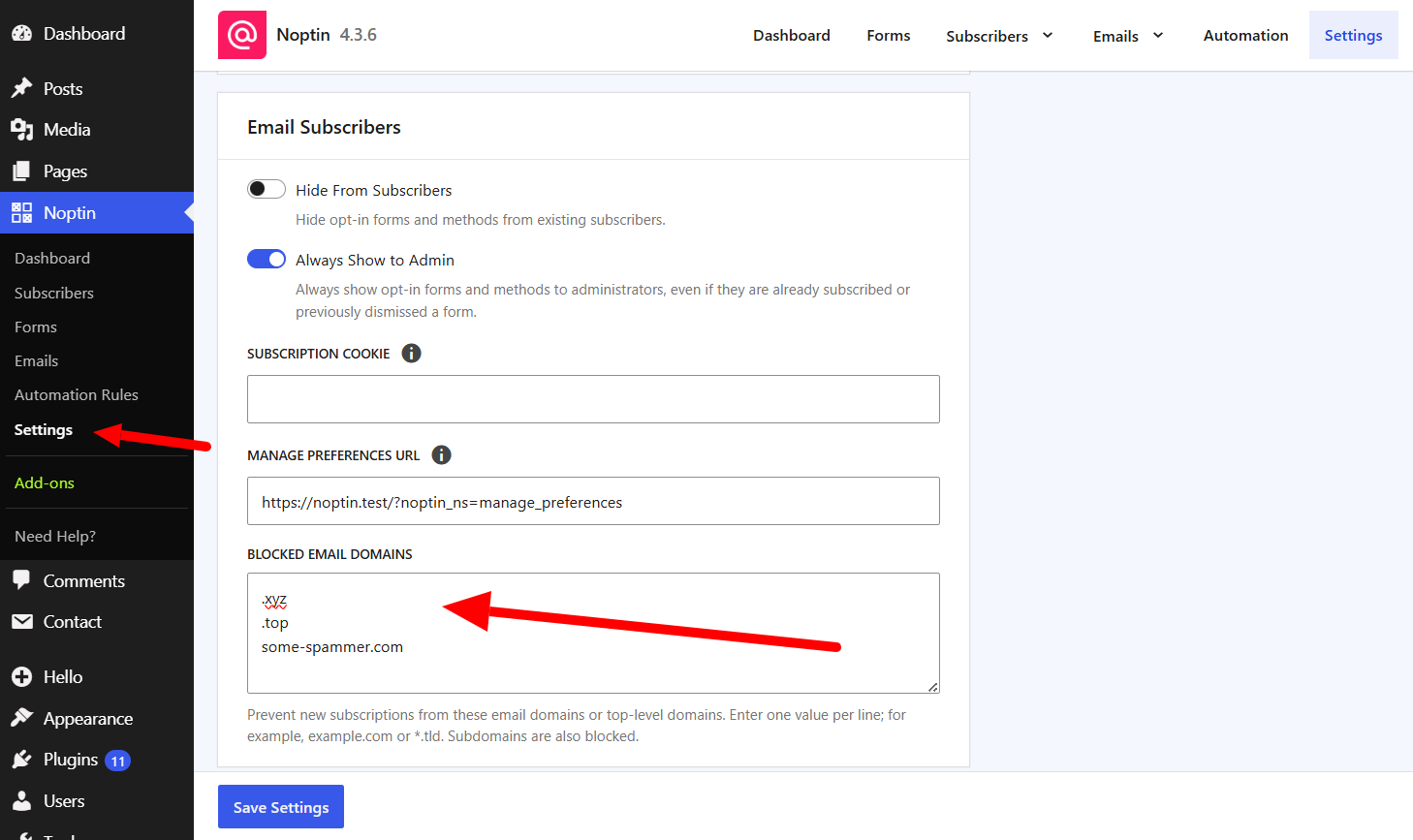
You can prevent new subscribers from using email addresses from specific domains or top-level domains (TLDs). Use this when unwanted sign-ups repeatedly come from the same email provider or domain ending.

The setting applies wherever Noptin creates a subscriber, including subscription forms, integrations, imports, manual additions, and REST API requests.

Choose the domains or TLDs to block

EntryWhat it blocksExample result
some-spammer.comThe exact domain and its subdomains[email protected] and [email protected]
.xyz or *.xyzEvery email domain using that TLD[email protected]

Blocking a TLD affects every email domain that ends with it. Use an exact domain when you only need to stop one provider.

Block new subscriptions from an email domain

  1. Open Noptin → Settings in your WordPress dashboard.
  2. Find the Email Subscribers section.
  3. In Blocked Email Domains, enter one domain or TLD per line.
  4. Click Save Settings.
The Blocked Email Domains field in Noptin settings containing two TLDs and one email domain
Enter each blocked domain or TLD on a separate line, then save the settings.

What happens to blocked sign-ups

  • Noptin does not create a new subscriber when the email domain matches an entry.
  • A full domain entry also blocks its subdomains.
  • A TLD entry blocks every email domain that ends with that TLD.
  • If someone changes a subscriber’s email address, Noptin rejects the change when the new address uses a blocked domain.

This setting does not remove subscribers who already use a matching domain. To exclude an existing address, block the individual newsletter subscriber.

When domain blocking is not enough

Domain rules are most useful when unwanted sign-ups share a predictable domain or TLD. If bots use many legitimate email providers, follow the guide to prevent spam sign-ups with CAPTCHA or Akismet.

Related Guides

  • Add a Subscriber Manually

    Add one subscriber manually in Noptin, choose their status and segmentation values, and understand what happens when the email already exists.

    Read More

  • Bounce Handling

    How to automatically delete subscribers who bounce or report your emails as SPAM

    Read More

  • Sync Subscribers

    Have you ever wished you had several newsletter sign-up forms on different websites that all collected subscribers into a single newsletter list? This guide shows you how to do that. Step 1: Create a listener on the master site. Open one of the sites and then create an automation rule that listens to incoming webhooks…

    Read More

  • Custom Fields

    One of the most powerful features of Noptin is its support for custom fields. You can use custom fields to store more information about your subscribers (such as their phone numbers and birthdays). This guide shows you how to create and edit custom fields. Creating Custom Fields To create a new custom field:- First, visit…

    Read More

  • Importing Subscribers

    Learn how to import subscribers from another system into Noptin.

    Read More

  • Subscriber Lists

    Learn how to use subscriber lists to organize contacts, target specific audiences, and send more relevant email campaigns in WordPress.

    Read More

  • Tagging Subscribers

    Learn how to manually or automatically tag or untag subscribers based on how they signed-up and the actions they take on your site. You can then filter email recipients by tags

    Read More

  • Double Opt-in

    This guide shows you how to enable double opt-in and how to edit the double opt-in email. Double opt-in means that subscribers will not receive any marketing emails unless they confirm their email addresses.

    Read More

  • Unsubscribing

    To comply with the CAN-SPAM Act and other email sending requirements, Noptin automatically adds a List-Unsubscribe header to every email it sends. This header allows email clients (such as Gmail and Apple Mail) to display a one-click unsubscribe button directly in their interface, making it easy for subscribers to opt out without even opening your…

    Read More

  • How to block newsletter subscribers

    Blocked subscribers are permanently excluded from your list—they won’t receive emails, and they can’t be re-added through forms, imports, or integrations.

    Read More

  • Automatically delete non-confirmed subscribers

    If you’ve enabled double opt-in, you can set up an automation rule that automatically deletes any subscriber who does not confirm their email address after a certain period. To do this:- First, open your admin dashboard and then click on Noptin > Automation Rules to open the automation rules overview page. Next, click the “Add…

    Read More

  • Deleting Subscribers

    Delete one subscriber, selected subscribers, or every subscriber matching a filter, and understand when unsubscribing or blocking is the safer action.

    Read More