
Both Noptin and Jetpack Newsletter can automatically email subscribers whenever you publish a new WordPress post.
Jetpack is a popular choice because it offers a straightforward way to let visitors subscribe to your blog. It also handles email delivery, so you don’t need to configure a separate email sending service.
But Jetpack isn’t your only option.
Noptin provides the same essential functionality for free, with unlimited subscribers and considerably more control over your notification emails.
You can customize email content, target specific subscribers, send personalized notifications based on their interests, and even notify WordPress users or WooCommerce customers.
Unlike Jetpack, Noptin is dedicated to email marketing and stores your subscriber data directly on your WordPress website.
Let’s look at the differences.
Noptin vs Jetpack: Feature Comparison
| Feature | Noptin | Jetpack Newsletter |
|---|---|---|
| Automatic new post notifications | Yes | Yes |
| Free newsletter subscribers | Unlimited | Supported |
| Customize notification content | Yes | Limited |
| Visual email layout editor | Yes (Premium) | Limited branding options |
| Category-based notifications | Yes | Yes |
| Personalized notifications using subscriber interests | Advanced conditional logic | Newsletter Categories |
| Filter by post tags, authors, and custom fields | Yes | Limited |
| Notify registered WordPress users | Yes | No |
| Notify WooCommerce customers | Yes | No |
| Custom post type notifications | Yes | No |
| Daily and weekly notifications | Yes | Yes |
| Monthly post digests | Yes | Not a standard frequency option |
| Store subscriber data in your WordPress database | Yes | Uses WordPress.com infrastructure |
| Requires a WordPress.com connection | No | Yes |
| Built-in managed email delivery | Uses your configured provider | Yes |
| Works on WordPress.com paid plans | Yes | Yes |
Both plugins work for basic WordPress blog subscriptions. The main differences become apparent when you want more control over who receives your emails, what those emails look like, and where your subscriber data is stored.
1. Noptin gives you more control over notification emails
Jetpack automatically generates notification emails from your published posts.
You can adjust some settings, including whether to display the full post or an excerpt, show featured images, and customize sender details.
However, full styling and branding customization isn’t currently available in Jetpack.
Noptin gives you more control.
Even with the free version, you can customize your post notification email’s subject and content using dynamic information such as the post title, excerpt, featured image, custom fields, and author details.
The free editor also lets you customize colors and typography, and even add custom CSS.
With Noptin’s premium visual email editor, you can go further and create branded email layouts using the familiar WordPress block editor.
You can add headings, images, buttons, columns, and other design elements without writing HTML.

Noptin also offers AI-assisted email creation to help generate beautiful email layouts, subjects, and content.
If you want your post notifications to look like newsletters from your own brand rather than standard automated notifications, Noptin offers considerably more flexibility.
2. Send the right posts to the right subscribers
Not every subscriber wants to read every article you publish.
Imagine your website covers WordPress, WooCommerce, and SEO.
Someone interested in WooCommerce tutorials probably doesn’t need an email every time you publish something about SEO.
Jetpack supports category-based subscriptions through its Newsletter Categories feature. Readers can choose which categories they want to follow, which is useful for blogs with a straightforward category structure.
Noptin also supports category filtering, but its conditional logic allows more advanced personalization.
For example, you can store each subscriber’s interests in a custom field, list, or tag and compare those interests with the tags on a newly published post.
Suppose you publish an article about WooCommerce:
| Subscriber | Interests | Receive email? |
|---|---|---|
| Jane | WooCommerce, WordPress | Yes |
| Mark | SEO | No |
| Alex | WooCommerce, SEO | Yes |
Noptin can evaluate these conditions individually for each subscriber using a single notification automation.
You don’t need to maintain separate automations for every topic.
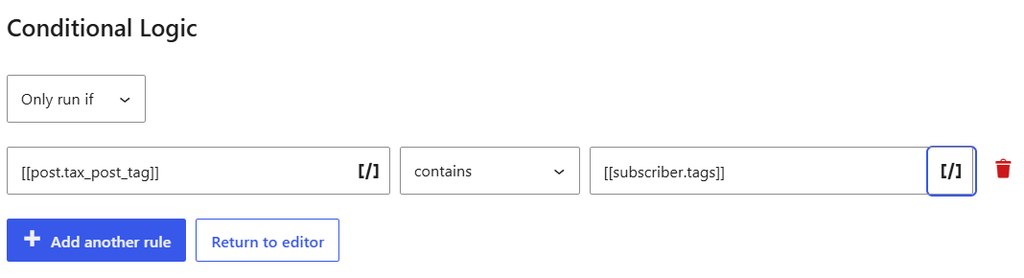
Noptin also supports more recipient types than a typical blog newsletter.
For example, you can:
- Notify registered WordPress users based on their roles.
- Email WooCommerce customers about newly published products.
- Send notifications for events, courses, listings, and other custom post types.
- Target subscribers using lists, tags, and custom fields.
- Notify contacts in supported external services such as Mailchimp, Brevo, and ActiveCampaign.
- Notify post authors when their posts are published.
These capabilities make Noptin particularly useful for membership websites, online stores, publishers, and websites that serve different audiences.
3. Noptin keeps your subscriber data on your website
This is another important difference.
Jetpack requires a WordPress.com connection and relies on Automattic’s infrastructure for features such as newsletter subscriptions and email delivery.
According to Jetpack’s documentation, connected sites synchronize certain website information with Automattic’s servers. This can include site settings, content, metadata, and other data required by Jetpack services.
Jetpack Newsletter also processes subscriber information as part of its subscription and email delivery functionality.
This is how Jetpack provides a managed service, but it means some of your sensitive website and newsletter data is handled outside your WordPress installation.
Noptin works differently.
Your subscribers, subscription forms, automation rules, and email marketing data are stored in your website’s WordPress database.
Noptin doesn’t require you to create an external newsletter account or synchronize your subscriber database with Noptin’s servers.
It also doesn’t collect plugin usage analytics or send your site’s content to Noptin’s servers as part of its standard newsletter functionality.
There are exceptions for services you choose to connect. For example, using an external SMTP provider, CRM integration, or AI service may involve transmitting the information needed by that provider.
Nevertheless, if you prefer to manage your subscriber database directly on your own WordPress installation, Noptin provides that option without depending on a hosted newsletter platform.
Noptin’s privacy-focused design helps you comply with regulations on customer data and keep that data secure.
4. Noptin is built specifically for WordPress email marketing
Jetpack is a broader WordPress toolkit.
Its ecosystem includes newsletters, security, backups, analytics, performance features, and other services.
That can be convenient if you want multiple Jetpack products.
However, if your main goal is to collect subscribers and send email notifications, you may not need those additional capabilities.
A multipurpose plugin can introduce extra settings and dependencies. Whether that affects website performance depends on which features are enabled and how the site is configured.
Noptin focuses specifically on email marketing.
Alongside new post notifications, it includes newsletter subscription forms, subscriber management, scheduled post digests, and email automations.
You can start with a simple blog newsletter and expand into more advanced email marketing without switching plugins.
What about email delivery?
Jetpack has one clear advantage here: it manages newsletter delivery through WordPress.com’s infrastructure.
With Noptin, emails are sent using your configured WordPress email delivery service.
This gives you the freedom to choose your preferred SMTP or transactional email provider, but you’ll need to ensure that it’s properly configured.
If you need a free option, Cloudflare’s email service lets you send emails at no cost, with a generous free limit. You can connect it with Noptin and use it to send your emails.
Noptin doesn’t impose its own subscriber-count or monthly email-volume limits on its free version. Your hosting or email delivery provider may have separate limits and costs.
Can Noptin be installed on WordPress.com?
Yes.
Noptin isn’t limited to self-hosted WordPress.org installations.
WordPress.com supports third-party plugins on eligible paid plans, including Personal, Premium, Business, and Commerce.
If your WordPress.com plan supports plugin installation, you can install Noptin instead of relying exclusively on Jetpack’s newsletter functionality.
Which should you choose: Noptin or Jetpack?
We recommend Noptin for most WordPress websites that want to automatically email subscribers when new posts are published.
Both plugins handle basic post notifications, but Noptin provides more flexibility without sacrificing the simplicity of the initial setup.
Choose Noptin if you want to:
- Customize your post notification emails.
- Manage unlimited subscribers without a plugin-imposed subscriber limit.
- Target subscribers based on their interests.
- Notify WordPress users, WooCommerce customers, or custom post type subscribers.
- Keep your newsletter data in your WordPress database.
- Build more sophisticated email marketing automations as your website grows.
Jetpack Newsletter is still a reasonable choice if you already use its WordPress.com-connected features, prefer managed email delivery, and are satisfied with its limited notification customization options.
But you don’t need Jetpack just to automatically email readers when you publish.
With Noptin, you can get started for free and customize your notification workflows as your audience grows.
Or follow this step-by-step guide to automatically emailing subscribers when you publish new WordPress posts.
You can also compare Noptin vs MailPoet and Noptin vs MailOptin if you’re considering other WordPress post notification plugins.


Leave a Reply