

Want to automatically email your subscribers whenever you publish a new WordPress post? Both Noptin and MailPoet can do that.
They can also send daily, weekly, or monthly emails containing your latest content, so you don’t have to create and send every newsletter manually.
The difference becomes clearer when you want more control over your notifications.
Noptin is our overall pick for WordPress new post notifications. It handles straightforward subscriber emails while also letting you filter posts, create personalized notifications using conditional logic, target different audiences, generate emails with AI, and send through services such as Mailchimp, Brevo, and Klaviyo.
MailPoet is a strong alternative, particularly if you already use it to manage your subscribers and newsletters.
In this comparison, we’ll look specifically at new post notifications rather than comparing every feature of the two plugins.
Noptin vs MailPoet at a glance
| Feature | Noptin | MailPoet |
|---|---|---|
| Automatically email subscribers when a post is published | Yes | Yes |
| Immediate new post notifications | Yes | Yes |
| Daily, weekly, and monthly post digests | Yes | Yes |
| Filter content by categories and tags | Yes | Yes |
| Pages and custom post types | Yes | Yes, for supported searchable post types |
| Filter notifications by post author and custom fields | Yes | More limited in the standard post notification workflow |
| Dynamically match each post to individual subscriber interests | Yes, using conditional logic | Typically uses separate lists and notifications |
| Notify WordPress users and WooCommerce customers | Yes | Yes, through lists and segments |
| Send to contacts in Mailchimp, Brevo, Klaviyo, and other platforms | Yes, through add-ons | No |
| AI-assisted notification email creation | Yes | No |
| Free option | Yes | Yes (Limited to 500 subscribers) |
Both plugins cover the essentials well. The main advantage of Noptin is how much control it gives you over which posts trigger notifications, which recipients qualify, and how the email is created and delivered.
1. Automatically email subscribers when you publish
Both Noptin and MailPoet let you create an automated email that is triggered when a new WordPress post is published.
You configure the notification once. After that, new content can be emailed to your subscribers without creating another campaign manually.
How Noptin works
With Noptin, you create a New Post Notification automated email, select your recipients, and customize the email.
The email can automatically include the published post’s title, excerpt, featured image, custom fields, and a link to read the full article.
For example:
New WordPress post published → Noptin generates the notification → subscribers receive the email.
You can use Noptin’s visual email editor to customize the design, or use AI to help generate it.
See the step-by-step Noptin new post notification guide.
How MailPoet works
MailPoet has a dedicated Latest Post Notification email type.
You select a schedule, choose an email template, and add its Automatic Latest Content widget to display recently published posts.
MailPoet automatically inserts the latest content into the notification when it sends.
Which is better?
Both are good choices for automatically emailing subscribers when you publish new posts.
Noptin offers more flexibility if you later want to introduce content filters, recipient-specific conditions, AI-generated emails, or external email services without changing your notification system.
2. Filter which posts trigger notifications
Not every post deserves an email.
For example, you might want to notify subscribers about tutorials but exclude company announcements. Or send product announcements without emailing people about ordinary blog posts.
Both plugins let you control which content appears in notifications, although their approaches differ.
Post filtering in Noptin
Noptin lets you create notification rules based on the published content.
You can filter by:
- Post category
- Post tags
- Post type
- Post author
- Custom taxonomies
- Custom fields, including supported ACF, Pods, and Metabox fields
For example, you could create a notification that runs only when a post is published in the Tutorials category by a particular author.
Or you could set up separate automations for blog posts, WooCommerce products, events, and other custom post types.
Post filtering in MailPoet
MailPoet also supports content filtering.
Its Automatic Latest Content widget can include or exclude specific categories and tags. It can also select supported pages, products, and custom post types.
That makes it possible to create a newsletter containing only posts from a particular category.
Which is better?
Both plugins work well for category-based notifications.
Noptin is the stronger choice when you need more detailed publishing conditions involving authors, custom fields, custom taxonomies, or combinations of post properties.
But content filtering alone is not the biggest difference.
That comes next.
3. Send personalized notifications using conditional logic
This is one of the most important differences between Noptin and MailPoet.
Imagine you run a WordPress website that publishes articles about SEO, WooCommerce, and WordPress development.
Your subscribers have different interests.
Someone interested in WooCommerce might not want an email every time you publish an SEO article.
Ideally, the notification system should automatically decide whether each new post is relevant to each individual subscriber.
How Noptin handles this
Noptin supports conditional logic for new post notification emails.
You can base these conditions on merge tags from the published post and the recipient’s properties.
For example, you can create a rule that only sends a notification when the published post’s tags contain one of the subscriber’s tags or lists.
This allows a single notification automation to dynamically match published content with individual subscriber interests.
Consider this example:
| Subscriber | Interests | New post | Notification |
|---|---|---|---|
| Jane | WooCommerce, WordPress | WooCommerce checkout tips | Send |
| Mark | SEO | WooCommerce checkout tips | Skip |
| Alex | WooCommerce, SEO | WooCommerce checkout tips | Send |
| Sarah | Email Marketing | WooCommerce checkout tips | Skip |
You do not need to choose recipients for each article or create separate new post notification automations.
Noptin evaluates the configured conditions and sends the notification only when the post matches the recipient.
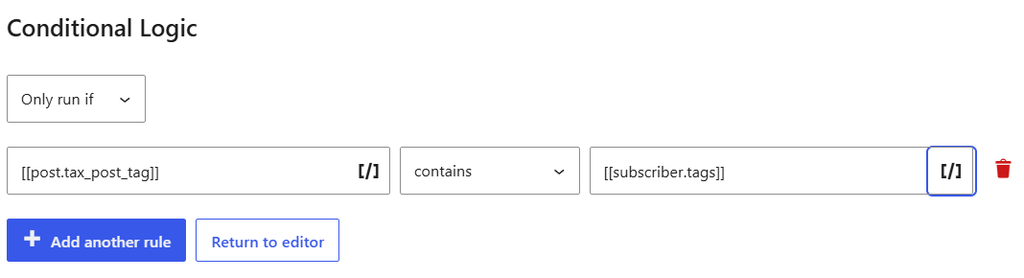
You can also use subscriber custom fields to store interests and reference those values inside notification conditions.
This is particularly useful for publishers, directories, membership websites, online communities, and other sites covering several topics.
How MailPoet handles subscriber interests
MailPoet can also send category-specific notifications.
The recommended approach is to create separate subscriber lists and post notification emails for each category.
For example, you might have:
- An SEO subscribers list with its own notification
- A WooCommerce subscribers list with its own notification
- A WordPress development subscribers list with its own notification
Each notification selects content from its corresponding category and sends it to the matching list.
This works well, especially when you have a small number of clearly defined topics.
The distinction is that Noptin can use conditional logic to compare the current post with an individual recipient’s properties inside the same notification automation.
Which is better?
Noptin is our choice for personalized new post notifications.
MailPoet’s list-based approach is effective for straightforward category subscriptions.
Noptin is more flexible when the relationship between the published post and the recipient needs to be evaluated dynamically, particularly when interests, tags, custom fields, or publishing conditions change.
4. Send notifications to subscribers, WordPress users, and customers
A post notification doesn’t always have to go to a conventional newsletter list.
You might want to email WordPress users when new members-only content is published, notify WooCommerce customers about new products, or alert a post author when their content goes live.
Noptin recipient options
Noptin supports several recipient types, including newsletter subscribers, WordPress users, user roles, WooCommerce customers, post authors, manual email addresses, and contacts from supported external email services.
Recipients can also be filtered using relevant information and custom fields.
For example, you can target subscribers by lists or tags, WordPress users by role, and WooCommerce customers by purchase related information.
MailPoet recipient options
MailPoet is not limited to ordinary blog subscribers either.
It supports a WordPress Users list, subscriber segmentation, and WooCommerce customer data.
MailPoet’s segmentation features can target audiences using information such as user roles, subscriber tags, and WooCommerce purchases.
See MailPoet’s segmentation documentation.
Which is better?
Both plugins offer meaningful audience targeting.
The advantage of Noptin is how these recipient options work together with its post publication triggers, conditional logic, and external email service integrations.
Noptin is particularly useful when you want one notification workflow to make decisions based on both the content being published and the recipient’s information.
5. Send WordPress post notifications through Mailchimp, Brevo, Klaviyo, and other services
Already using an email marketing service?
You may not want to migrate all your contacts into another newsletter platform just to start sending WordPress post notifications.
Noptin provides add-ons that connect WordPress automations to external email marketing platforms.
Supported services include Mailchimp, Brevo, Klaviyo, ActiveCampaign, AWeber, Constant Contact, GetResponse, MailerLite, Mailjet, SendGrid, SendPulse, Sendy, Zoho Campaigns, and others.
For example, you can configure Noptin to send a new post notification to subscribers in your existing Mailchimp audience.
You can also filter those external contacts using supported lists or tags.
This is useful because you can keep the audience and email infrastructure you already use while letting Noptin manage the WordPress automation.
MailPoet, by comparison, is designed primarily around managing audiences and sending its newsletter campaigns through MailPoet’s own workflows.
Which is better?
Noptin is the better fit if you want to automate WordPress post notifications while continuing to use contacts in an existing external email marketing platform.
The supported services require their respective Noptin integrations, and some integrations may require a paid plan.
6. Create post notification emails with AI
Both plugins have visual email editors, so you do not need to write HTML to create a new post notification.
Noptin also offers AI-assisted email creation.
When creating an automated email, you can describe the kind of notification you want.
For example:
Set up a friendly email automation announcing new blog posts. Include the title, a short summary, and a button encouraging subscribers to read the full article.
Noptin AI can generate the email’s subject line, content, layout, and calls to action.
You can then review and edit the email before activating the automation.
MailPoet has an established email editor with templates and dynamic content blocks, but equivalent AI generation is not part of its standard Latest Post Notification setup.
Which is better?
Noptin has the advantage if you want AI to help create the notification email.
However, you can use Noptin without AI. Build and customize the email yourself or start with an email template. AI features are optional.
7. Send daily, weekly, or monthly post digests
Sending an email for every post is not always desirable.
If you publish several articles a day, such as on a news or listing site, subscribers may prefer a single email with your latest content.
Both Noptin and MailPoet support scheduled post notifications.
Noptin post digests
Noptin lets you automatically send a digest of recently published content.
You can configure daily, weekly, monthly, and other supported schedules.
The digest editor can include recent posts, WooCommerce products, recipes, events, and custom post types.
You can filter the content by properties such as category, tag, and author, and configure the email to skip sending when there is no new content.
See how to create WordPress post digest emails with Noptin.
MailPoet post digests
MailPoet’s Latest Post Notification feature also supports immediate, daily, weekly, and monthly schedules.
Its Automatic Latest Content widget inserts recent posts into the email, and the notification can skip sending when no new qualifying posts are available.
Which is better?
Both are good choices for scheduled post digests.
Noptin offers additional flexibility when combining content types, recipient options, and external email service integrations.
For most sites, the decision between the two will depend more on the other features discussed in this comparison than on digest scheduling alone.
8. Design emails using the familiar WordPress block editor
Both Noptin and MailPoet offer visual email editors, but they approach email design differently.
Noptin’s WordPress block editor
Noptin’s premium visual email editor is built on the familiar WordPress block editor.
If you’ve created a WordPress page or blog post using blocks, you’ll already be familiar with the editing experience.
You can add and arrange headings, paragraphs, images, buttons, columns, and other email elements without writing HTML.
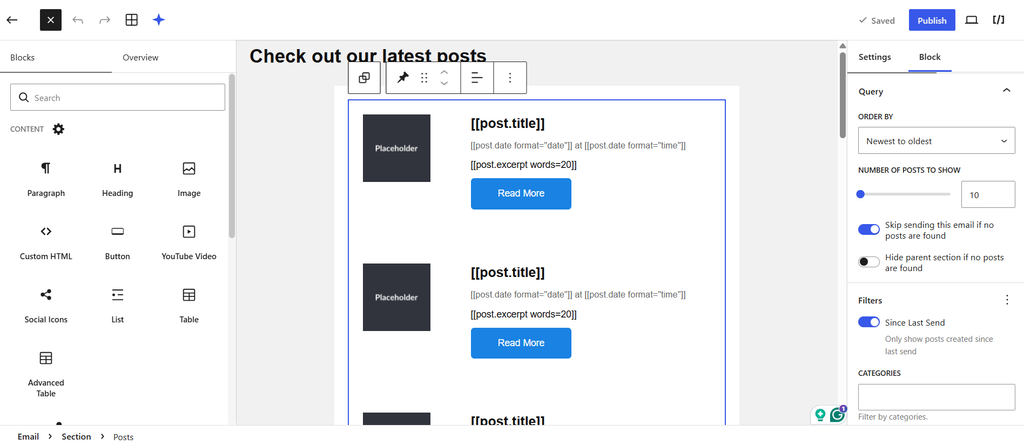
You can also use Noptin AI to generate the email’s initial content and design, then customize the result using the block editor.
See how to use Noptin’s visual email editor.
MailPoet’s email editor
MailPoet has its own drag-and-drop email editor.
It provides text, images, buttons, columns, templates, and other design elements. You arrange them inside MailPoet’s custom editing interface.
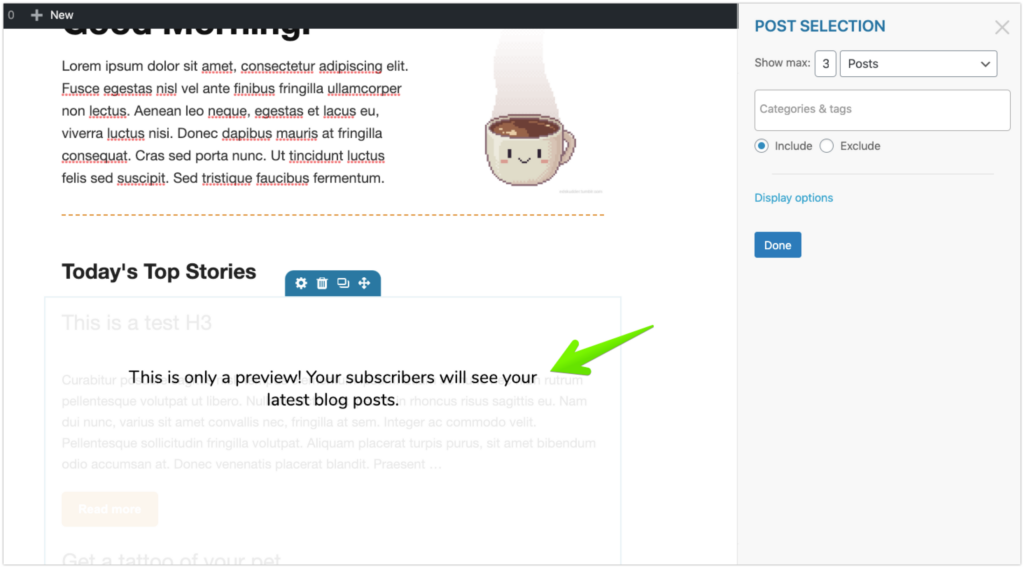
MailPoet’s editor is capable, but it uses a different interface from the WordPress post editor.
Which is better?
Both editors can create attractive notification emails.
Noptin has an advantage for WordPress users who prefer the familiar block editing experience instead of learning a separate email builder. This is especially vital if you’re creating websites for non-technical clients.
Noptin vs MailPoet free plans: Subscriber and email limits
One of the biggest differences between Noptin and MailPoet is how their free versions handle subscriber growth and email sending.
| Free plan feature | Noptin | MailPoet |
|---|---|---|
| Collect subscribers | Unlimited | Up to 500 |
| Monthly email limit imposed by the plugin or plan | No fixed limit | 5,000 |
| Automatic new post notifications | Yes | Yes |
| Scheduled post notifications or digests | Yes | Yes |
| Need to upgrade because your list exceeds 500 subscribers | No | Yes |
| Sending service | Your configured WordPress email delivery service | MailPoet Sending Service |
Noptin: Unlimited subscribers and emails
Noptin’s free plugin lets you collect and manage unlimited newsletter subscribers.
It also does not impose a fixed monthly limit on how many newsletters or automatic post notifications you can send.
For example, you could have 2,000 subscribers and automatically email them whenever you publish a new post without upgrading simply because your subscriber list has grown.
Actual email sending capacity depends on your web host or configured SMTP or email delivery service. Those providers may impose their own sending limits or charges.
You can, however, set up your own unlimited email sending service using Postal on a $3/month VPS.
MailPoet: 500 subscribers and 5,000 emails per month
MailPoet’s free Starter plan supports up to 500 subscribers and 5,000 emails per month.
The advantage is that the free plan includes access to MailPoet’s own email sending service.
However, if your subscriber list grows beyond 500 contacts, you’ll need to upgrade to continue sending. MailPoet also counts eligible WordPress users and WooCommerce customers toward its subscriber limits.
For example, a site with 500 subscribers that publishes 12 posts per month could require 6,000 notification emails if every subscriber receives every post. That exceeds MailPoet’s free monthly sending allowance.
Which free version is better?
Noptin is our pick for sites that want to grow their subscriber lists without paying based on subscriber count.
Its free version has no built-in subscriber or monthly email volume cap, although sending capacity and deliverability still depend on your email provider.
MailPoet’s free plan may be more convenient if you have fewer than 500 subscribers and want an included email sending service.
For growing WordPress newsletters, Noptin offers more flexibility without forcing an upgrade solely because your audience gets bigger.
Which is better for WordPress new post notifications?
Both Noptin and MailPoet can automatically email subscribers when new content is published.
MailPoet is a capable newsletter plugin with an established editor, subscriber management, content filtering, and scheduled post notifications.
It’s an especially convenient choice if you already use MailPoet for your newsletters and want to keep your existing workflow.
Noptin is our overall recommendation for new post notifications.
It covers the same essential workflow of automatically emailing subscribers when you publish, but gives you additional control over content filtering, personalized conditional logic, recipient selection, external email platform integrations, and AI-assisted creation.
You can start with a simple notification and introduce more advanced rules as your site’s needs grow.
The important difference is that you don’t have to choose between an ordinary subscriber notification and a more sophisticated automation. Noptin can handle both.
Frequently asked questions
Noptin is our overall pick for automatic new post notifications. Both plugins can email subscribers when new content is published, but Noptin also supports advanced conditional logic, post filters, external email service integrations, AI-assisted creation, and more flexible recipient targeting.
MailPoet remains a strong alternative, especially for sites already using its newsletter system.
Yes. MailPoet’s Automatic Latest Content widget supports including or excluding specific post categories and tags.
For category-based subscriptions, MailPoet recommends configuring separate subscriber lists and notification emails for each category.
Noptin also supports category and tag filters and can dynamically match published posts to subscriber interests through conditional logic.
Yes. Noptin’s new post notification conditional logic can evaluate properties of the published post against individual subscriber information.
For example, you can configure notifications so that a post is only emailed when its tags match a subscriber’s stored interests, lists, or tags.
This lets you personalize which new posts each subscriber receives without having to create multiple new post automations.
Yes. Noptin offers a Mailchimp integration that lets you automate new post notification emails for contacts in your existing Mailchimp audience.
Noptin also integrates with services such as Brevo, Klaviyo, ActiveCampaign, and MailerLite.
You can keep using your existing email platform while Noptin manages the WordPress publishing automation.
Yes. Both plugins can automatically send an email after a new post is published and support scheduled emails containing recent content.
Noptin also allows you to delay new post notifications when you want time to make corrections after publishing.
Yes. Noptin AI can generate the subject line, content, layout, and calls to action for an automated post notification email.
You can review and edit the generated email before activating the automation.
Start sending new post notifications with Noptin
Whether you want to email subscribers whenever you publish a post or create personalized notifications that match each article to the right readers, Noptin gives you the tools to automate the process.
Start with a simple notification, then add content filters, conditional logic, post digests, AI, or external email integrations when you need them.
Learn how to create your first new post notification with Noptin
You can also compare other options in our guide to the best free WordPress post notification plugins.


Leave a Reply