

Looking for a WordPress plugin that automatically emails subscribers when you publish a new post? Both Noptin and MailOptin can do that.
They both support immediate new post notifications, content filtering, custom post types, and scheduled email digests. Both can also send notifications through external services such as Mailchimp, Brevo, ActiveCampaign, and Klaviyo.
So which should you choose?
Noptin lets you collect unlimited newsletter subscribers and email them about new posts for free. There is no built-in subscriber limit or monthly email cap. You can manage your audience and send newsletters directly from WordPress without subscribing to an external email marketing service.
MailOptin Lite can send new post notifications to registered WordPress users. However, collecting and managing newsletter subscribers through its built-in MailOptin Leads feature requires a premium plan. Sending automated notifications to external mailing lists is also a premium feature.
The editing experience is another major difference. Noptin offers a visual email editor based on the familiar WordPress block editor, while MailOptin uses an email customization interface based on the outdated WordPress Customizer.
In this comparison, we’ll focus on the features that matter when you’re automatically emailing people about newly published WordPress content.
Noptin vs MailOptin at a glance
| Feature | Noptin | MailOptin |
|---|---|---|
| Free newsletter subscriber management | Yes, unlimited | No (premium feature) |
| Free new post notifications to newsletter subscribers | Yes | No |
| Send notifications to registered WordPress users | Yes | Yes |
| Monthly email limit imposed by the plugin | None | None |
| Immediate new post notifications | Yes | Yes |
| Daily, weekly, and monthly digests | Yes | Yes, premium |
| Category, tag, author, and post type filters | Yes | Yes |
| Dynamic recipient-specific conditional logic | Yes | No |
| External email marketing integrations | Yes, through add-ons | Yes, premium |
| AI-assisted email creation | Yes, premium | No |
| Visual email editing experience | WordPress block editor | WordPress Customizer-based editor |
Both plugins handle the basics well. The clearest advantages of Noptin are its free newsletter subscribers and post digests functionality, recipient-specific conditional logic, familiar editing experience, and AI-assisted email creation.
1. Automatically email subscribers when you publish a post
Both Noptin and MailOptin can automatically send emails whenever you publish new WordPress content. However, their free versions differ significantly.
Noptin lets you collect unlimited newsletter subscribers and automatically email them about new posts for free. There’s no plugin-imposed subscriber limit or monthly email cap, although your email delivery service may impose its own limits.
For example, if your blog has 10,000 newsletter subscribers, Noptin can automatically email them whenever you publish a new article without requiring a paid license.
The notification can include the post’s title, featured image, excerpt, custom fields, and a link to read the full article.
MailOptin Lite also supports new post notifications, but its free version is limited to registered WordPress users. These are people with WordPress accounts on your website, not necessarily visitors who signed up using a newsletter form.
To store newsletter subscribers in MailOptin’s built-in Leads database and send them automated post notifications, you need a premium plan.
The difference: If you want visitors to subscribe to your newsletter and automatically receive new posts, Noptin provides that complete workflow for free. MailOptin requires a paid plan for the equivalent functionality.
See how to automatically email subscribers when you publish a WordPress post.
2. Filter posts by category, tags, author, and custom fields
Not every published post deserves an email notification.
For example, you might want to notify subscribers about new tutorials while excluding company announcements. Or perhaps you want to email readers only when a particular author publishes an article.
Both Noptin and MailOptin let you control which posts trigger notifications.
MailOptin supports filtering by categories, tags, post authors, post types, and custom taxonomies. It also offers language-based filtering for multilingual websites using plugins such as WPML and Polylang.
Noptin supports these common content filters and goes further with conditional logic. You can create notification rules based on post categories, tags, authors, post types, custom taxonomies, language, and custom fields, including supported fields created using ACF, Pods, and Meta Box.
For example, with Noptin, you could configure notifications to send only when:
- A post belongs to the Tutorials category.
- An article is published by a particular author.
- A new WooCommerce product is published in a specific category.
- An event’s custom field matches a particular value.
- Multiple conditions are satisfied, such as a specific category and author.
- Both the author and subscriber or user share the same language or locale.
This is particularly useful for membership websites, directories, online stores, and other WordPress sites that rely on custom post types and custom fields.
Both plugins handle ordinary category and tag filtering well. Noptin has an advantage when notification rules depend on more detailed conditions or custom field values.
Noptin can also take filtering a step further by comparing the published post’s properties with each subscriber’s interests, allowing different subscribers to receive different notifications from the same automation.
3. Personalize new post notifications using conditional logic
Filtering posts by category or tag is useful, but what if different subscribers are interested in different topics?
Imagine running a WordPress website that publishes articles about Travel, Gossip, and Music. Some subscribers are interested in Travel, others prefer Gossip, and some want updates about both.
You don’t want to email everyone whenever you publish a new article.
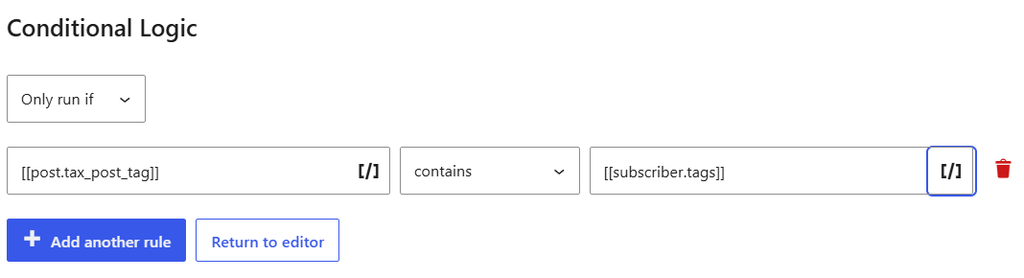
Noptin lets you personalize new post notifications using conditional logic that compares the published post’s properties with each subscriber’s information.
For example, you can create a rule that sends a notification only when the published post’s tags match one of the subscriber’s tags or lists.
Suppose you publish an article titled 10 Travel Tips.
| Subscriber | Interests | Notification |
|---|---|---|
| Jane | Travel, Music | Send |
| Mark | Gossip | Skip |
| Alex | Travel, Gossip | Send |
| Sarah | Music | Skip |
Noptin evaluates the condition for each recipient. Jane and Alex receive the notification because they’re interested in Travel, while Mark and Sarah don’t.
You can achieve this with a single new post notification automation, without manually selecting recipients or creating separate automations for every topic.
Noptin can also use subscriber custom fields and segments in these conditions, making it useful for websites where readers have multiple or changing interests.
MailOptin also supports targeted notifications, but its approach relies on selecting mailing lists or segments and filtering which posts trigger each automation. For example, you could create one automation for Travel subscribers and another for Music subscribers.
MailOptin’s standard new post notification workflow does not have the same dynamic, recipient-by-recipient comparison between a published post’s properties and each subscriber’s interests.
The difference: Both plugins can send topic-specific notifications, but Noptin can dynamically determine whether each individual subscriber should receive a particular post using conditional logic.
This makes Noptin especially useful for publishers, membership websites, directories, and other sites with subscribers who follow different topics.
4. Send notifications to WordPress users, customers, and external mailing lists
Newsletter subscribers aren’t the only people you might want to notify when publishing new content.
For example, you might want to email registered WordPress users when new members-only content becomes available, notify WooCommerce customers about new products, or alert an author when their article is published.
Both Noptin and MailOptin support sending new post notifications to different types of recipients, including WordPress users, WooCommerce customers, and contacts in supported external email marketing platforms.
Noptin lets you send notifications to:
- Newsletter subscribers: People who subscribe through your Noptin forms, with unlimited subscriber management available for free.
- WordPress users: Registered users, optionally filtered by their roles, custom fields, or other properties.
- WooCommerce customers: Customers selected using relevant information, such as their purchase history and location.
- Post authors: Automatically notify the author when their content is published.
- External mailing lists: Contacts stored in services such as Mailchimp, Brevo, Klaviyo, and ActiveCampaign.
- Specific email addresses: Send notifications to manually selected recipients.
You can also use conditional logic to further control which recipients receive each notification.
MailOptin supports WordPress users and user roles, WooCommerce customers, and recipients associated with supported membership and learning management plugins. Its premium version also supports sending notifications to contacts in external email marketing services.
However, MailOptin’s built-in subscriber management feature, MailOptin Leads (LeadBank), requires a premium plan. Noptin, by comparison, lets you collect and manage unlimited newsletter subscribers for free.
For external mailing lists, both plugins require their respective premium integrations or automation features.
The difference: Both plugins offer flexible recipient targeting, but Noptin combines free newsletter subscriber management with WordPress user notifications, WooCommerce customer targeting, and conditional logic that can evaluate each recipient individually.
This makes it useful whether you’re running a simple blog, an online store, a membership website, or a publication with multiple subscriber interests.
5. WordPress block editor vs WordPress Customizer
Both Noptin and MailOptin let you customize new post notification emails without writing HTML. However, their editing experiences are quite different.
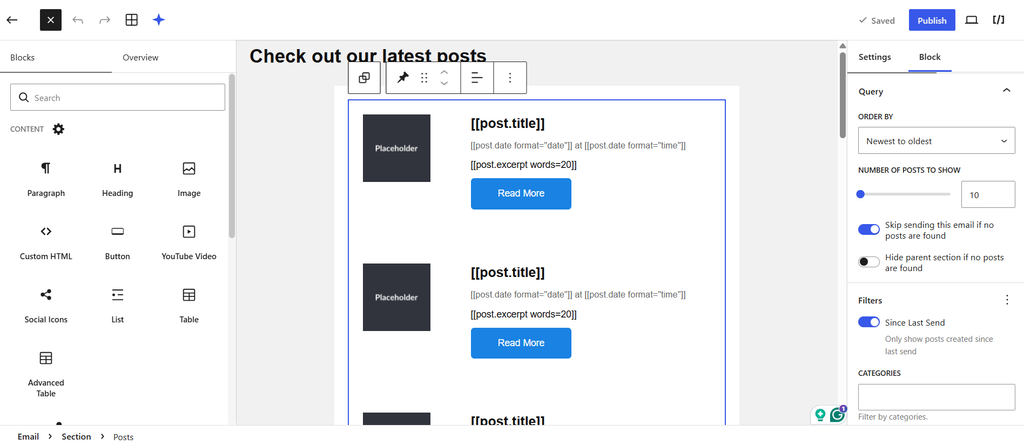
Noptin’s visual email editor uses the familiar WordPress block editor (Gutenberg). If you’ve created a WordPress post or page, you’ll already know how to use it.
You can drag and arrange blocks for headings, paragraphs, images, buttons, columns, and other email content. You can also include dynamic information from the published post, such as its title, excerpt, featured image, and a link to read the full article.
This makes it easy to create custom email layouts using the same editing experience you already use elsewhere in WordPress.
Noptin also offers AI-assisted email creation. Instead of building an email from scratch, you can describe what you want, and Noptin AI will generate the subject line, content, layout, and calls to action. You can then customize the result using the block editor.
See how to use Noptin’s visual email editor.
MailOptin, on the other hand, uses an email editor based on the WordPress Customizer.
Rather than inserting and arranging blocks, you customize emails through settings panels alongside a live preview.

These settings let you control elements such as the email header, footer, post content, featured image, author information, and other template details. MailOptin also provides text-editing controls for content placed before and after the main post content.
While this approach works for configuring predefined email templates, it doesn’t offer the same block-based design experience as Noptin.
For WordPress users who prefer Gutenberg or the classic editor, Noptin provides a more familiar and flexible way to design notification emails. This is particularly useful when building websites for clients who already know how to edit WordPress pages but don’t want to learn another editing interface.
MailOptin’s Customizer-based approach may still suit users who prefer adjusting predefined template settings instead of building email layouts with blocks.
6. Send immediate notifications or scheduled digests
If you publish occasionally, you might want subscribers to receive an email as soon as a new post goes live. But if you publish several articles a day, sending an email for every post could overwhelm your readers.
Both Noptin and MailOptin support immediate new post notifications and scheduled email digests, allowing you to choose how frequently subscribers hear from you.
With Noptin, you can:
- Send immediately: Automatically notify subscribers whenever you publish a new post.
- Delay notifications: Wait a specified amount of time before sending, giving you a chance to make corrections after publishing.
- Send daily, weekly, or monthly digests: Combine recently published content into a single email instead of sending individual notifications.
- Filter digest content: Include only posts matching specific categories, tags, authors, custom fields, or supported post types.
- Skip empty digests: Avoid sending emails when there’s no new content to share.
For example, a news website that publishes 10 articles a day could use Noptin to send one daily digest featuring the latest stories. A smaller blog could instead notify subscribers immediately whenever a new post is published.
These standard notification and digest features are available in Noptin’s free version, without a built-in subscriber-count or monthly email limit. Your email delivery service may impose its own sending limits.
See how to create automatic WordPress post digests with Noptin.
MailOptin offers similar scheduling options. You can send notifications immediately after publication, delay them, or schedule daily, weekly, and monthly digests.
However, MailOptin’s scheduled email digests are a premium feature, starting at $289 per year. Its free version supports immediate new post notifications for registered WordPress users, but sending automated notifications to newsletter subscribers also requires a paid plan.

The difference: Both plugins provide flexible notification schedules, but Noptin lets you send immediate notifications and scheduled digests to your newsletter subscribers for free. With MailOptin, you’ll need a paid plan for the equivalent newsletter automation workflow.
7. Noptin vs MailOptin: Free versions and pricing
One of the biggest differences between Noptin and MailOptin is what you can accomplish without purchasing a premium license.
Noptin lets you collect unlimited newsletter subscribers and automatically email them when you publish new posts for free. MailOptin Lite can notify registered WordPress users, but managing your own newsletter subscribers and sending them automated post notifications requires premium functionality.
What can you do for free?
| Feature | Noptin Free | MailOptin Lite |
|---|---|---|
| Collect newsletter subscribers | Unlimited | Through supported external services |
| Store newsletter subscribers in WordPress | Yes, free | Requires premium MailOptin Leads |
| Automatically email newsletter subscribers about new posts | Yes | Requires premium |
| Notify registered WordPress users about new posts | Yes | Yes |
| Daily, weekly, and monthly post digests | Yes | Requires premium |
| Subscription forms | Yes | Yes |
With Noptin, you can start a newsletter, collect your first subscribers, and automatically notify them whenever you publish new content.
You won’t need to upgrade simply because your audience grows from 100 to 1,000 or even 10,000 subscribers.
Noptin also doesn’t impose a monthly email sending limit. However, your actual sending capacity depends on your hosting provider or configured email delivery service, which may impose its own limits or charges.
MailOptin Lite takes a different approach. Its free version provides opt-in forms and can send new post notifications to registered WordPress users.
However, its built-in subscriber management feature, called MailOptin Leads (LeadBank), is premium. Sending automated post notifications to newsletter subscribers, whether stored in MailOptin Leads or an external email marketing service, also requires premium functionality.
This makes Noptin particularly attractive to bloggers and publishers who want to build an email audience without paying for newsletter software from day one.
How much do the premium versions cost?
Both plugins offer paid plans that unlock additional features.
Here are their regular annual prices:
| Plan | Annual price | Websites | Email automation and newsletters |
|---|---|---|---|
| Noptin Personal | $149 | 1 | Included |
| Noptin Growth | $199 | 3 | Included |
| MailOptin Standard | $99 | 1 | Not included |
| MailOptin Pro | $289 | 3 | Included |
Prices reflect regular annual rates as of October 2026, excluding temporary discounts and promotions.
An important detail is that MailOptin’s $99 Standard plan does not include its premium email automation or newsletter features. To access those features, you’ll need the $289/year Pro plan.
Noptin takes a different approach. All its paid plans include the same premium features, including:
- Dozens of beautiful email templates.
- AI-assisted email and automation creation.
- Advanced automation and conditional logic features.
- Premium integrations with external email marketing platforms.
- Access to all premium add-ons.
The main difference between Noptin’s paid plans is how many websites you can use them on.
For a single WordPress website, Noptin Personal costs $149/year. If you manage three websites, Noptin Growth costs $199/year, compared with $289/year for MailOptin Pro.
That makes Noptin $90 per year cheaper for three websites at regular prices.
Which offers better value?
Noptin offers better value for WordPress websites focused on newsletters and new post notifications.
Its free version already includes the essentials: subscriber collection, newsletter management, automatic new post notifications, and scheduled digests, without imposing subscriber-count or email-volume limits.
MailOptin may still be worth considering if you mainly want its lead-generation and conversion-optimization features, such as A/B testing.
But if your goal is to collect subscribers and automatically email them whenever you publish new WordPress content, Noptin provides a more complete free solution and a more affordable upgrade path.
8. When should you choose MailOptin instead?
Although Noptin is our overall recommendation for WordPress new post notifications, there are situations where MailOptin may be the better fit.
MailOptin is particularly worth considering if your primary goal is lead generation rather than email automation and newsletters.
Its strengths include advanced opt-in forms, popup targeting, display rules, and conversion optimization features such as A/B testing.
For example, if you want to display different newsletter signup popups based on visitor behavior, test which forms generate more subscribers, or create targeted lead-generation campaigns, MailOptin’s premium features may appeal to you.
MailOptin may also make sense if:
- You’re already using MailOptin Pro. Keeping your opt-in forms and new post notifications within the same plugin could simplify your workflow.
- Conversion optimization is your priority. MailOptin offers advanced tools for testing and optimizing subscription forms.
- You prefer its Customizer-based email editor. If you’re comfortable adjusting predefined email templates through settings panels, you may not need Noptin’s drag-and-drop editor.
However, if your primary goal is to collect newsletter subscribers and automatically email them when you publish new WordPress content, Noptin offers a more compelling starting point.
You can manage unlimited subscribers, send new post notifications and scheduled digests for free, and upgrade when you need AI-assisted email creation or additional integrations.
Which is better for WordPress new post notifications?
Noptin is our overall recommendation for WordPress new post notifications, especially if you want to build a newsletter audience and automatically email subscribers whenever you publish new content.
Unlike MailOptin Lite, which limits free post notifications to registered WordPress users, Noptin lets you collect unlimited newsletter subscribers and send them automated post notifications and scheduled digests for free.
Noptin also offers advanced features for growing websites, including recipient-specific conditional logic, AI-assisted email creation, and a visual editor built on the familiar WordPress block editor.
MailOptin remains a good choice if you’re already using its premium lead-generation tools or want advanced popup targeting and conversion optimization alongside your email automations.
For most WordPress websites focused on newsletters and new post notifications, we’d choose Noptin. It provides a complete free starting point and the flexibility to create more sophisticated automations as your needs grow.
Frequently asked questions
Noptin is our overall recommendation for WordPress new post notifications. Both plugins support automatic post notifications, content filtering, and scheduled digests, but Noptin offers a more complete free newsletter solution.
Noptin lets you collect unlimited subscribers and automatically email them about new posts for free. It also offers recipient-specific conditional logic, AI-assisted email creation, and a visual editor built on the WordPress block editor.
MailOptin is worth considering if you already use its premium lead-generation and popup optimization features.
Yes. Noptin’s free plugin lets you collect newsletter subscribers and automatically email them whenever you publish a new WordPress post.
There are no plugin-imposed subscriber-count or monthly email limits, although your hosting provider or email delivery service may have its own restrictions.
MailOptin Lite can notify registered WordPress users for free, but automatically emailing newsletter subscribers requires premium functionality.
Yes, but with limitations. MailOptin Lite supports immediate new post notifications to registered WordPress users, including users belonging to selected roles.
To send automated notifications to newsletter subscribers stored in MailOptin Leads or external services such as Mailchimp, you need a premium plan.
Noptin’s free version supports automatic new post notifications to newsletter subscribers without requiring a paid license.
MailOptin Lite provides opt-in forms that can collect subscribers through supported external email marketing services.
However, its built-in subscriber management feature, called MailOptin Leads or LeadBank, requires a premium plan.
Noptin lets you collect, store, and manage unlimited newsletter subscribers directly inside WordPress for free.
Yes. Noptin supports conditional logic that can compare the published post’s properties with information about individual subscribers.
For example, you can create a rule that sends notifications only when the post’s tags match a subscriber’s stored interests, tags, or lists.
This allows a single automation to send relevant articles to different subscribers without creating a separate notification for every topic.
MailOptin supports targeted notifications through content filters and audience selection, but does not provide the same dynamic recipient-by-recipient matching.
Yes. Both plugins support daily, weekly, and monthly emails containing recently published WordPress content.
Noptin includes standard post digests in its free version, while MailOptin’s scheduled Email Digest feature requires a premium plan.
Noptin’s recipient-specific conditional logic applies to individual new post notifications, not to the posts within scheduled digests.
Yes. Both plugins integrate with popular email marketing services, including Mailchimp, Brevo, Klaviyo, and ActiveCampaign.
These integrations let you automate WordPress post notifications for contacts stored in supported external mailing lists.
Premium features or addons are required for these workflows in both plugins.
No. MailOptin’s email editor is based on the WordPress Customizer. It uses settings panels and a live preview to customize notification templates.
Noptin’s visual email editor uses the familiar WordPress block editor (Gutenberg), allowing you to insert and arrange headings, images, buttons, columns, and other email content using blocks.
Noptin also supports AI-assisted email creation, which can generate an initial design and content for you to customize.
Start sending new post notifications with Noptin
You don’t have to recreate a newsletter every time you publish new content.
With Noptin, you can automatically email subscribers when a post is published, filter notifications by content, personalize who receives each email using conditional logic, and create notification emails with AI.
Start with the free plugin and add premium features as your requirements grow.
Learn how to create your first new post notification with Noptin
You can also explore our comparison of the best free WordPress post notification plugins or read our Noptin vs MailPoet comparison.


Leave a Reply