
If you run a WooCommerce store, the right newsletter plugin should do more than add an email field to checkout. It should help you turn interested shoppers into subscribers, send useful campaigns, and reach the right customers without creating an unnecessarily complicated marketing setup.
Noptin is our best overall WooCommerce newsletter plugin for stores that want a simple, lightweight way to manage email marketing in WordPress. Its free plugin supports checkout newsletter signups and newsletters without a Noptin-imposed subscriber limit. With paid add-ons, you can target customers by their purchases, create email campaigns and automations with AI, and send checkout subscribers to external platforms such as Mailchimp instead of being locked into a single email tool.
Other plugins are better for some needs. MailPoet is a strong option if you want a WordPress newsletter editor with an integrated sending service. Omnisend is geared toward hosted email and SMS marketing. Brevo is worth comparing for its email-volume-based options, and Mailchimp for WooCommerce makes sense if your team already runs campaigns in Mailchimp.
Best WooCommerce newsletter plugins at a glance
| Plugin | Best for | Newsletter workflow | Checkout signups / key distinction |
|---|---|---|---|
| Noptin | Lightweight WordPress-native newsletters, flexible integrations and AI-assisted workflows | Manage newsletters in WordPress; choose your email delivery method | Free checkout signups and newsletters; paid purchase targeting, AI and external-service connections |
| MailPoet | WordPress newsletters with an integrated sending option | Write in WordPress; send with MailPoet or a supported alternative | WooCommerce customer segmentation; Starter allows 500 subscribers and 5,000 emails/month |
| Omnisend | Hosted ecommerce email and SMS | Campaigns in Omnisend | Checkout opt-ins and store syncing; free plan reaches up to 250 contacts with 500 emails/month |
| Brevo | Hosted marketing with email-volume-oriented plans | Campaigns in Brevo | Checkout opt-ins and store syncing; free plan allows 300 emails/day |
| Mailchimp for WooCommerce | Stores already using Mailchimp | Campaigns in Mailchimp | WooCommerce customer/order sync; free plan allows 250 contacts and 500 emails/month |
The key distinction is that collecting subscribers, creating emails, and delivering emails are separate tasks. A plugin may handle all three or connect to a separate email marketing service. Compare the complete workflow, not just whether the WooCommerce connector is free.
What should a WooCommerce newsletter plugin do?
At minimum, a useful WooCommerce newsletter plugin should let shoppers subscribe at checkout, help you manage consent and subscribers, create newsletters, and send those emails reliably. Stores with repeat customers may also benefit from purchase-based segments, new-product alerts, welcome sequences, and integrations with an existing CRM or email service.
For example, the ideal setup for a small coffee shop could be: customer opts in at checkout → joins a newsletter list → receives a useful welcome email → later receives a targeted offer based on what they purchased. Whether you send those messages in WordPress or from a platform such as Mailchimp should be your choice.
1. Noptin: Best overall WooCommerce newsletter plugin for WordPress
Best for: WooCommerce stores that want a lightweight, easy-to-use newsletter plugin, free checkout subscriber collection, optional connections to external marketing services, and room to grow into AI-assisted campaigns and purchase-based automation.
Noptin puts newsletter management inside the WordPress dashboard you already use for WooCommerce. You do not need a separate hosted marketing platform just to collect subscribers and send a basic newsletter. Start with the free plugin and add advanced capabilities when your store needs them.
Collect newsletter subscribers at WooCommerce checkout
Noptin’s free WooCommerce newsletter integration lets you place a subscription checkbox on your checkout page without writing code.
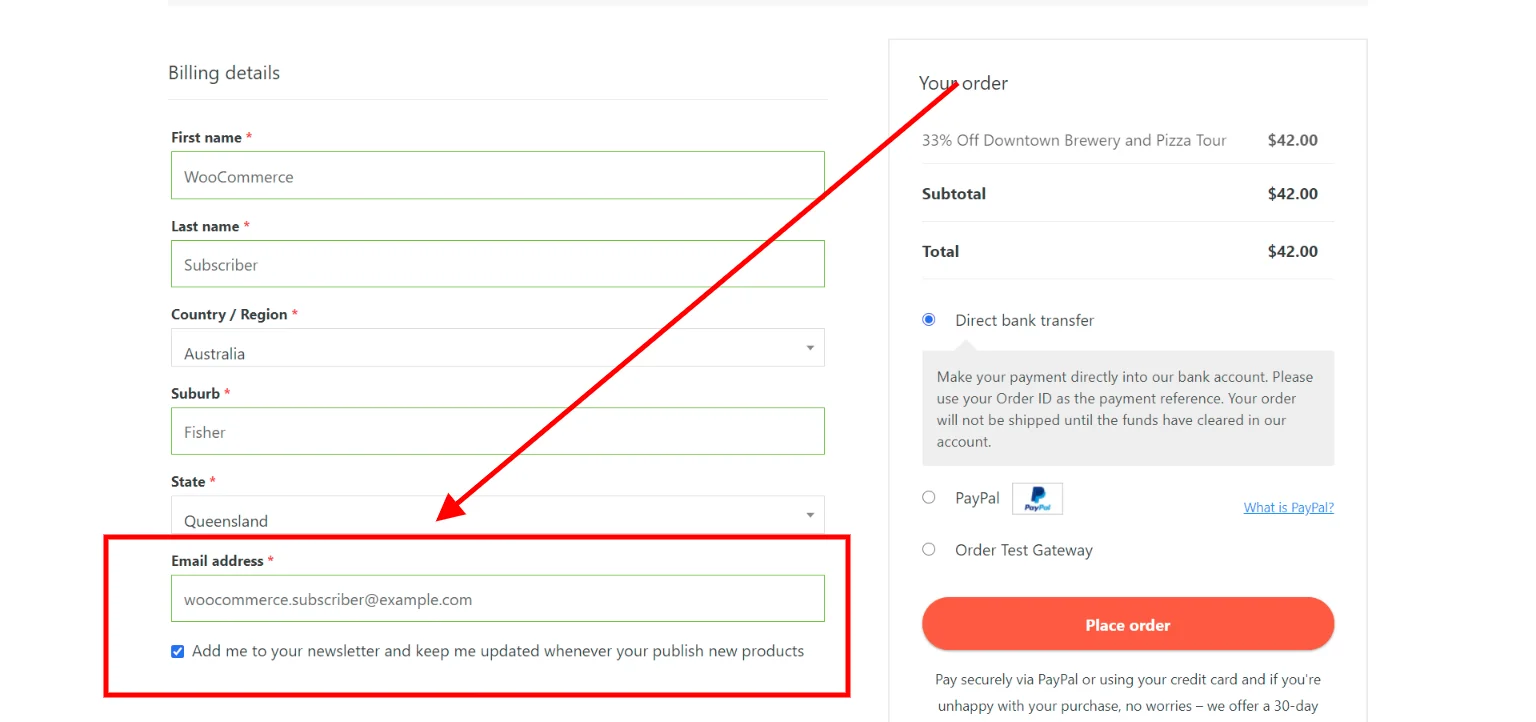
You can edit the checkbox wording and choose where it appears. For permission-based email marketing, configure an explicit opt-in and follow the consent rules that apply to your customers.
This matters because a buyer may want product news without being ready to subscribe through a separate popup or landing page. The checkout checkbox offers a convenient moment to ask. Once someone opts in, you can send newsletters about new arrivals, restocks, seasonal promotions, or useful content.
Send checkout subscribers to Mailchimp, Brevo and other services
You do not have to send your newsletters through Noptin to benefit from its WooCommerce checkout integration. With the appropriate Noptin integration add-on, you can connect supported external email services and pass new checkout subscribers to them. That includes services such as Mailchimp.
For example: customer checks the newsletter box at WooCommerce checkout → Noptin captures the subscription → a configured integration adds the contact to your Mailchimp audience. You can keep using Mailchimp to design and send your campaigns while Noptin handles the WordPress-side collection and integration. External-provider accounts, list mapping, and relevant add-ons must be configured, and the external service may charge its own fees.
This makes Noptin useful even for stores that already have an email marketing provider: you can use it as a checkout newsletter signup tool, a WordPress newsletter tool, or a bridge between WooCommerce and other marketing systems.
Create newsletters and automations with AI
Premium Noptin plans include AI-assisted email and automation creation. Describe the newsletter you want, such as a new-product announcement for returning customers, and Noptin will create an editable draft with a subject line, content, layout, and calls to action. You can also describe a workflow and generate an automation to review and adjust in WordPress.
For a busy store owner, this reduces the blank-page problem. You can start from a prompt rather than build every campaign or automation rule manually.
Send relevant emails based on what customers bought
Noptin lets you target WooCommerce customers by purchase history, including products they have or have not purchased and the timing of past orders. You can also use billing and shipping regions to narrow campaigns.
A coffee store, for example, could offer a grinder to customers who bought coffee beans but have not bought that grinder. A clothing store could announce a new collection to customers who purchased related items. The point is to send more relevant emails instead of the same promotion to everybody.
Automate new product announcements and follow-ups
Noptin can notify customers when you publish a WooCommerce product, so regular product launches do not always require a new manual campaign. Paid automation features can also support more involved workflows, including follow-up sequences and rules connected to store activity.
For a simple store, you can begin with occasional newsletters. As your marketing becomes more sophisticated, you can add automation without replacing your basic newsletter system.
Keep the setup lightweight and the costs predictable
Noptin is designed to be lightweight and straightforward to use: its basic newsletter and checkout signup workflow runs inside WordPress, without requiring you to learn a separate hosted campaign dashboard. Actual performance depends on your site, hosting, active features, and email setup.
Noptin also does not price its plugin by the number of subscribers or impose its own per-email sending fee. Your hosting or chosen email delivery service may still have sending caps and charges. For reliable campaigns, configure an appropriate email delivery provider and include it in your costs.
- Free: WooCommerce checkout newsletter signup, subscriber management, newsletters, and new post notifications.
- Paid: WooCommerce purchase-based targeting, AI email creation, advanced automations, and supported external-platform add-ons.
- Flexible sending: Use your WordPress email delivery setup for Noptin newsletters, or connect supported marketing platforms for external audiences and workflows.
- Trade-off: Setting up a separate delivery provider or integration takes more configuration than an all-in-one hosted service.
Choose Noptin if you want to collect WooCommerce subscribers without a large marketing stack, manage campaigns in WordPress, or connect checkout signups to an existing service. Install Noptin for free, follow the WooCommerce checkout guide, or compare premium plans for AI, integrations, and advanced targeting.
2. MailPoet: Best for WordPress newsletters with integrated sending
Best for: store owners who want to write WooCommerce newsletters in WordPress and prefer an integrated sending service.
MailPoet combines a WordPress email editor, subscriber collection, and WooCommerce marketing features. It supports segments based on WooCommerce purchase data, making it a real alternative for shops that want targeted campaigns without moving to a separate marketing dashboard.
Its MailPoet Sending Service is convenient if you want email creation and delivery managed by the same vendor. MailPoet also supports other sending approaches on eligible plans. The free Starter plan, as of November 17, 2026, includes 500 subscribers and 5,000 emails a month, with branding; see current plan details.
Choose MailPoet when integrated sending is a priority. Choose Noptin when you place more value on an uncapped subscriber list within the plugin, AI-assisted creation, or the option of connecting WooCommerce checkout subscribers to other marketing platforms through add-ons.
3. Omnisend: Best for WooCommerce email and SMS marketing
Best for: stores running coordinated email and SMS campaigns from a hosted ecommerce platform.
Omnisend’s WooCommerce integration syncs contacts, orders, and products with Omnisend. It also supports checkout opt-ins, on-site tracking, and abandoned-cart and checkout follow-ups through email or SMS.
Its free plan, checked November 17, 2026, allows 500 emails per month to up to 250 contacts. Paid costs depend on contacts, features, and messaging usage; check current pricing, especially SMS charges.
Choose Omnisend if ecommerce-focused multichannel campaigns are central to your strategy. If you mainly need lightweight newsletters, WooCommerce checkout signups and WordPress-based control, Noptin may be a simpler fit.
4. Brevo: Best for stores comparing plans by email volume
Best for: stores that want a hosted email platform and need to compare sending volume, contact limits, and automation features.
The Brevo WooCommerce connector syncs contacts, orders, and products to Brevo and can collect checkout opt-ins. Marketing campaigns are managed in the external service.
Brevo’s free plan, checked November 17, 2026, includes 300 email sends per day and storage for up to 100,000 contacts. That daily sending cap matters: a promotion meant for 1,000 subscribers cannot reach everyone on the same day under the free allowance. Compare current plans for the sending capacity and automations you need.
Choose Brevo if its hosted workflow and sending limits fit your needs. Noptin may be a better fit if you want to manage newsletters in WordPress or collect WooCommerce signups in Noptin and send them to Brevo.
5. Mailchimp for WooCommerce: Best for established Mailchimp users
Best for: teams already using Mailchimp audiences, templates, reporting, and marketing workflows.
Mailchimp for WooCommerce links customer and order data to a Mailchimp account, where campaigns are created and sent. This is practical when you already rely on Mailchimp and want store activity to inform marketing.
The free connector does not remove Mailchimp’s account limits. As of November 17, 2026, its free plan allows 250 contacts and 500 sends per month, with a daily sending cap of 250. See current pricing. Store syncing also needs monitoring; Mailchimp notes that some ecommerce automations depend on a completed sync in its troubleshooting guide.
Choose Mailchimp for WooCommerce if Mailchimp is already your main marketing hub. But if your immediate need is a checkout subscription checkbox, you can also use Noptin with its Mailchimp integration to collect subscribers at WooCommerce checkout and add them to your Mailchimp audience.
Frequently asked questions
Can I add a free newsletter checkbox to WooCommerce checkout?
Yes. Noptin’s free WooCommerce integration lets you add a customizable newsletter subscription checkbox to checkout without writing code. Configure a clear opt-in so customers understand what they are subscribing to.
Can Noptin add WooCommerce checkout subscribers to Mailchimp?
Yes. With the appropriate Mailchimp integration add-on and configured account connection, Noptin can pass subscribers collected through WooCommerce to Mailchimp.
You can then continue creating and sending campaigns in Mailchimp.
Does Noptin support AI-generated WooCommerce emails?
Yes. Noptin AI can draft editable newsletters and generate automation workflows from plain-language instructions. You can then review the generated emails, recipients, and conditions before sending or activating them.
Can I email only WooCommerce customers who purchased a certain product?
Yes, with Noptin’s WooCommerce targeting. You can filter audiences by purchase-related information, including products customers have or have not bought. MailPoet also offers WooCommerce purchase-based segmentation, so compare the specific filtering and campaign workflow you want.
Does Noptin charge more as my subscriber list grows?
Noptin does not impose a subscriber-count limit or per-email plugin fee. But sending thousands of emails can cost money through your host or email delivery provider. Its paid features also require a license.
Is Noptin better than MailPoet for WooCommerce?
Noptin is a better fit if your priorities are a lightweight WordPress workflow, free checkout collection, flexible third-party integrations, and AI-assisted campaign creation.
MailPoet may be better if you want an integrated sending service. Both can serve WooCommerce stores; the better choice depends on your workflow.
Final verdict: Which WooCommerce newsletter plugin should you choose?
Noptin is our top recommendation for WooCommerce stores that want a lightweight, easy-to-use newsletter plugin that runs inside WordPress. You can collect subscribers at checkout for free, send newsletters without subscriber-based plugin fees, and connect supported external services such as Mailchimp.
As your needs grow, premium Noptin plans add AI-assisted campaign creation, purchase-based customer targeting, and automated emails.
MailPoet is worth considering if you prefer bundled email delivery, while Omnisend is a better fit for stores that need coordinated email and SMS marketing.
Ready to start?
Install Noptin for free and add your WooCommerce newsletter checkout checkbox. When you need external integrations, AI, advanced automations, or purchase-based targeting, see premium Noptin plans.

Leave a Reply