
When you publish a newsletter campaign, Noptin will send the email to your subscribers as quickly as possible.
However, most hosting providers and SMTP services impose strict caps on outbound mail volume to prevent spam.
Email Sending Limits by Web Host
For reference, we’re compiling a list of limits imposed by some of the most popular hosts. Contact your host if you’re not sure about their email sending limits.
| Web Host | Email Provider | Sending Limits |
| 1and1 | Servers: 25 emails per 5 minutes Unlimited Pro: 3500 emails per hour |
| 20i Stackmail | 8,000 emails per day |
| A2 Hosting | 100 emails per hour |
| AccuWeb | 500 emails per hour |
| All-Inkl.com | 1000 emails every 10 minutes |
| BlueHost | 500 emails per hour |
| Charter | 50 emails per hour |
| Comcast | Residential customers: 1,000 emails per day Business customers: 24,000 emails per day |
| DomainFactory (df.eu) | 500 emails per hour with Sendmail 1000 emails per session with SMTP |
| DreamHost | 100 emails per hour |
| Free.fr | 100 emails per hour |
| FrogHost.com | 1000 emails per hour |
| Gmail | 500 emails per day |
| Google Apps | 100 emails per hour 500 emails per day |
| GoDaddy | 250 emails per day on regular hosting 1000 emails per day on dedicated/virtual servers |
| Goneo | 250 emails per hour |
| GreenGeeks | 100 emails per hour |
| hawkhost.com | 2000 emails per hour |
| Hivetec | 80 emails per hour |
| Homestead | 10 emails per second |
| Host Gator | 500 emails per hour |
| Host Monster | 500 emails per hour |
| Hosting 2GO | 50 emails per 15 minutes |
| Hostinger | 500 emails per hour |
| HostPapa | 50 emails/hour (per mailbox) |
| Hotmail | 100 emails per day |
| Infomaniak | 20 emails per 15 minutes |
| InMotion | 750 emails per hour |
| iPowerWeb | 500 emails per hour |
| JustHost | 150 emails per hour |
| Lunarpages | Shared Windows Environment: 200 emails per hour Shared Linux Environment: 400 emails per hour Dedicated Email Server: No limits |
| Media Temple | 500 emails per hour |
| Namecheap (Private Email) | Trial accounts: 50 emails/hour (per domain) Starter: 500 emails/hour (per domain) Pro: 1,000 emails/hour (per domain) Ultimate: 1,500 emails/hour (per domain) |
| Netfirms | 200 emails per hour |
| Netissime | 500 emails per 15 minutes |
| PHPNet | 100 emails per hour |
| PlanetHoster | 200 emails per hour |
| RackSpace | No limits |
| RoadRunner | 1,000 emails per day (per IP) |
| Rochen | 100 emails per 10 minutes |
| Siteground | 400 emails per hour |
| Site5 | 500 emails per hour |
| Synthesis | 1000 emails per hour |
| Techark | 250 emails per hour |
| TVCNet.com | 600 emails per hour |
| VPS.net | 200 emails per hour |
| Webcity | 20 emails per 6 minutes |
| Westhost | 1000 emails per hour |
| wpwebhost.com | 200 emails per hour |
| Verizon | 500 emails per hour |
| Vexxhost | 250 emails per hour for shared hosting 500 emails per hour for semi-dedicated hosting |
| Yahoo | 100 emails per hour |
Exceeding these caps can result in:
- Mail delivery failures (your host may temporarily block further sending)
- Queue delays (emails wait until the next allowable window)
- Account suspension (repeated overages can lead to longer blocks)
Set Email Sending Limits in Noptin
To prevent these issues, Noptin allows you to define a rolling email sending limit.
For example, you can tell Noptin to send “no more than 100 emails in any 60-minute window,” or “no more than 500 emails in any 24-hour window,” etc.
To do this:-
- Open your WordPress admin dashboard and then go to Noptin > Settings > Emails.
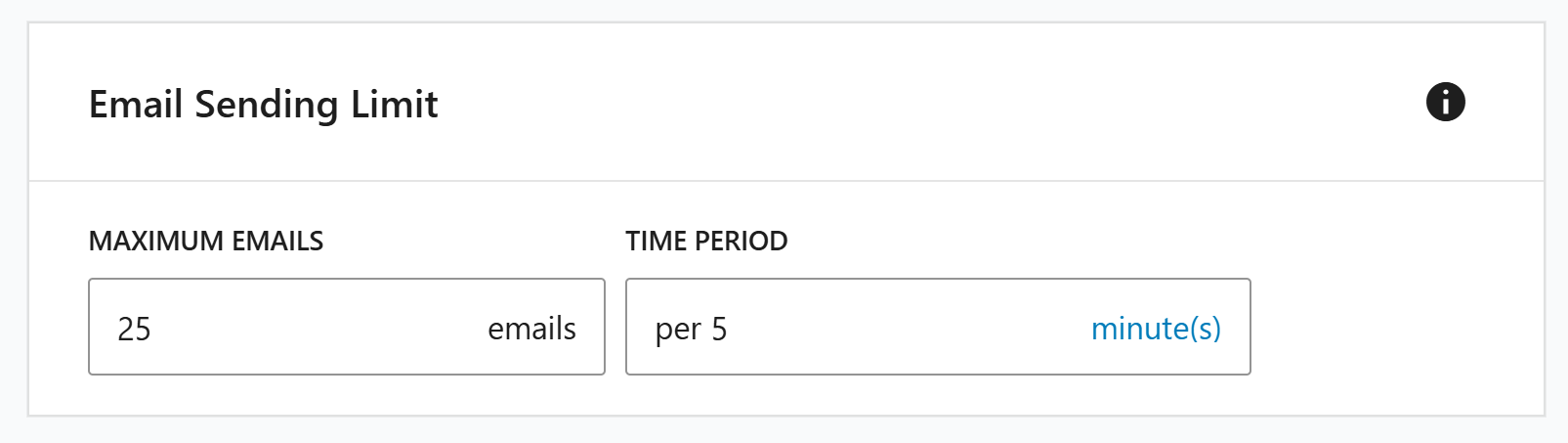
- Scroll down to the “Email Sending Limit” section and then set your limit as shown below.
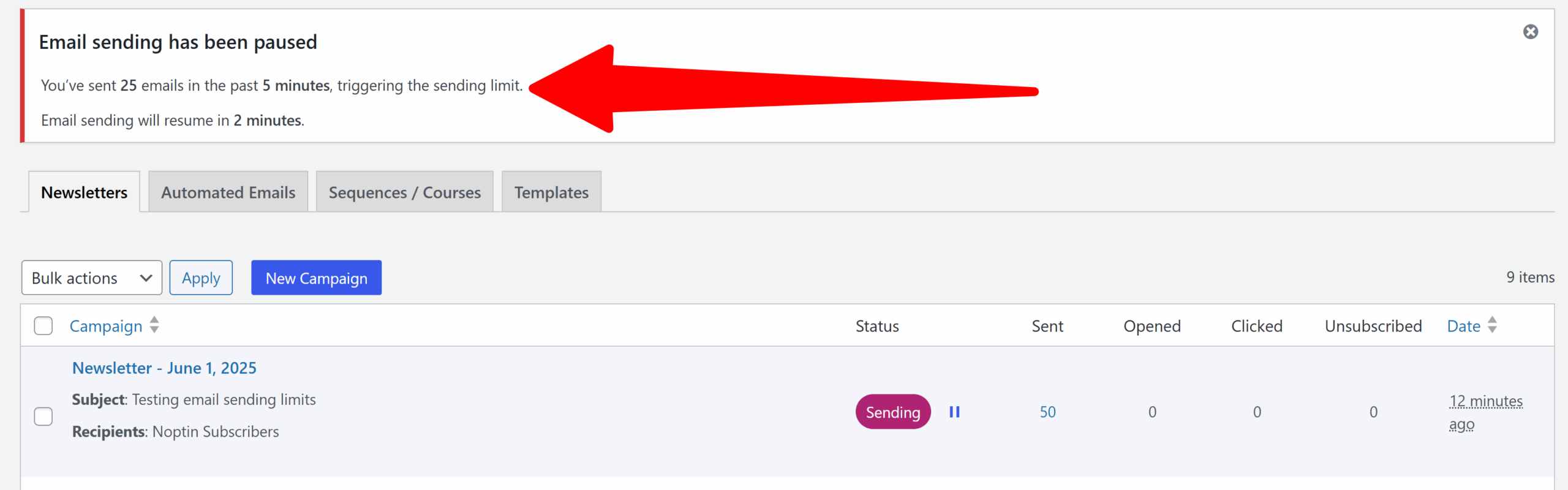
If you exceed this limit, Noptin will temporarily pause email sending.
How the Rolling Limit Works
A rolling limit continuously measures the number of emails sent during the immediately preceding interval.
For instance, if your limit is set to 50 emails per past 15 minutes, Noptin will never send more than 50 emails in any 15-minute window, regardless of when you start or stop the mailing. There is no midnight reset; the window simply moves forward in time.
Sending resumes gradually as more sent emails drop off the rolling window.
Why is my email sending slower than the limits I set?
If you set Noptin to send, for example, 200 emails per minute but it only sends 100, the issue is likely your infrastructure, not the settings. Your sending speed depends on a chain of performance factors:
1. Noptin Configuration Limits
This is the only factor you have direct control over within the plugin. If your “Emails per interval” setting is too low, Noptin will intentionally idle to stay within those bounds.
Tip:
Check if you have other plugins (like an SMTP plugin with its own throttling) that might be fighting with Noptin’s internal limits.
2. The “SMTP Handshake” Overhead
Standard SMTP (Simple Mail Transfer Protocol) requires a “conversation” between your website and the mail server for every single email.
Your server connects, authenticates, requests to send, transfers data, waits for a success confirmation, and then disconnects.
Even a fast connection takes 0.5 to 2 seconds per email. If it takes 1 second per email, you can physically never send more than 3,600 emails per hour, regardless of your settings.
If your email provider (like SendGrid, Mailgun, or Postmark) offers an API connection, you should always choose it over SMTP.
APIs use HTTP to send data in batches without the heavy back-and-forth of SMTP. This makes them much faster and better for sending large volumes of email.
3. Web Server Resources
Noptin uses WP-Cron to process the email queue. On low-traffic websites, WP-Cron may not run often enough to send emails promptly.
To fix this, you can set up an external CRON job to trigger the email sending more reliably.
In addition to that, if your web host has limited resources, the PHP process that creates the email content, such as replacing email tags like [[first_name]], will take longer. This delay slows down the entire email queue.
Leave a Reply