
Email marketing is not just about how many people you can get on your list. It is about how many of those people actually want to hear from you. “List hygiene” is just a fancy way of saying you should regularly remove email addresses that do not work or people who never open your messages.
If you use Noptin, keeping your list clean is straightforward because the plugin includes built-in tools for managing subscribers, tracking engagement, and removing inactive contacts.
Why Should You Clean Your List?
Maintaining list hygiene can improve your email marketing performance in several ways.
- Better Deliverability: If many of your emails go unopened or bounce, email providers (like Gmail) might start marking all your mail as spam.
- Lower Email Sending Costs: Some email services charge based on the number of subscribers or emails sent. Removing inactive contacts reduces costs and ensures you only send emails to people who matter.
- More Accurate Campaign Analytics: When inactive or fake subscribers are removed, your open and click rates reflect genuine engagement.
Simple Ways to Clean Your List with Noptin
Maintaining a healthy list requires consistent habits rather than a one-time cleanup.
1. Use a “Confirmation” Step (Double Opt-In)
The best way to keep a list clean is to make sure only real people join.
Double opt-in requires subscribers to confirm their email address before being added to your list. This prevents fake or mistyped email addresses from entering your database.

Pro Tip:
You can set up an automation rule that automatically deletes subscribers who stay in “Pending” status for more than 7 days.
This keeps your database from filling up with unconfirmed addresses.
2. Remove Hard Bounces
A “bounce” happens when an email cannot be delivered, for example, when an email address does not exist.
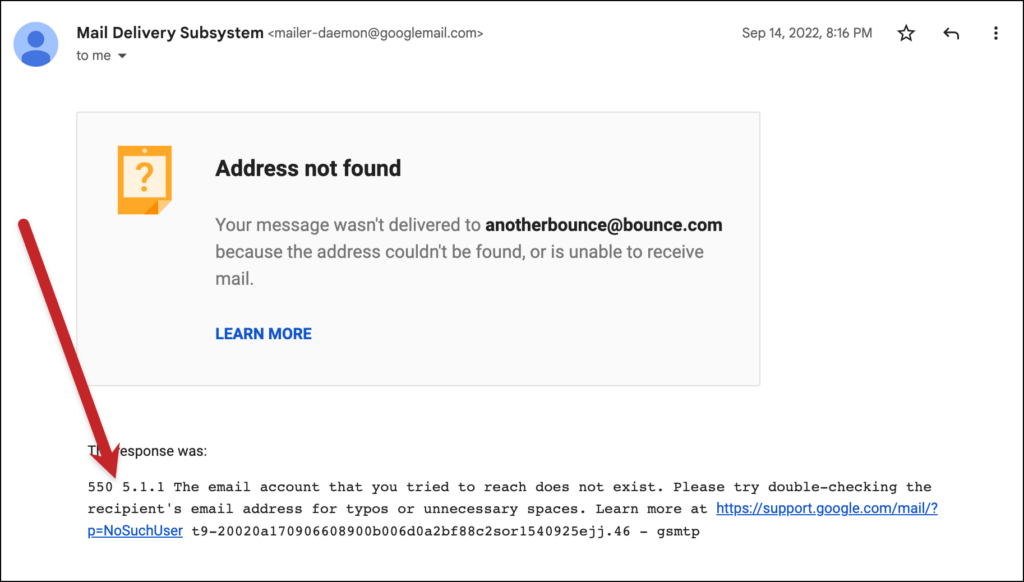
Continuing to send emails to these addresses hurts deliverability.
If you use an external SMTP service to send your mail (like Amazon SES or SendGrid), you can connect it to Noptin. When the service sees a broken email, it tells Noptin, and Noptin marks that person as “bounced” so you don’t try to email them again.
Pro Tip:
If you don’t use an SMTP service or Noptin lacks a bounce handler for your service, you can automate bounce handling with tools like Zapier or Make.com.
3. Monitor Subscriber Engagement
Every few months, it’s a good idea to look at people who haven’t opened an email in a long time (like 6 months).
You can find these people in your Noptin subscribers list.
If they aren’t reading your content, it’s often better to just delete them. This keeps your list full of people who actually enjoy your work.
Leave a Reply