
When an email fails to reach a subscriber, or someone marks it as spam, continuing to send emails to that address can hurt your sender reputation.
Noptin’s bounce handler helps prevent this by automatically updating subscriber statuses when your email sending service reports bounced emails, spam complaints, or supported unsubscribe events.
How bounce handling works
Noptin uses webhooks to receive delivery notifications from your email sending service.
Here’s what happens:
- Noptin sends an email using your configured email sending service, such as Mailgun, Amazon SES, or SendGrid.
- The sending service detects a problem, such as a permanent delivery failure or spam complaint.
- The service notifies Noptin by sending the event details to your site’s bounce handler URL.
- Noptin identifies the affected subscriber using the email address included in the notification.
- Noptin updates the subscriber’s status based on the reported event.
Once a subscriber is marked as bounced, complained, or unsubscribed, Noptin no longer considers them an active subscriber.
Which email events does Noptin handle?
Noptin processes three main types of events:
| Event | What happens |
|---|---|
| Hard bounce | The subscriber is marked as Bounced when your sending service reports a permanent delivery failure. |
| Spam complaint | The subscriber is marked as Complained when they report your email as spam. |
| Unsubscribe | The subscriber is marked as Unsubscribed when your sending service reports a supported unsubscribe event. |
The exact events Noptin receives depend on your email provider.
What about soft bounces?
A soft bounce is a temporary delivery failure. It can happen when a recipient’s mailbox is full, their email server is temporarily unavailable, or a message is temporarily rejected.
Unlike hard bounces, soft bounces don’t necessarily mean the email address is invalid.
Noptin ignores temporary failures reported by supported providers that distinguish them from permanent bounces. For example, Mailgun’s integration processes permanent failures but ignores temporary ones.
This helps avoid marking subscribers as bounced because of temporary delivery problems.
What happens to bounced subscribers?
When Noptin receives a supported bounce or complaint notification, it updates the affected subscriber’s status in your WordPress database.
Subscribers marked as Bounced, Complained, or Unsubscribed are no longer considered active and are excluded from email sends that target active subscribers.
Noptin does not automatically delete these subscribers. Their records remain in your subscriber list so you can review their statuses. If needed, you can set up an automation rule to delete them automatically.
If a provider includes the original Noptin campaign ID in its notification, Noptin can also associate the bounce or complaint with that campaign.
Does bounce handling change how emails are sent?
No. Bounce handling and email sending are separate processes.
You can continue using your existing WordPress SMTP plugin or email sending connection.
Your sending service delivers the emails, while Noptin’s bounce handler receives notifications about delivery failures, complaints, and supported unsubscribe events.
You don’t need to change your email sending configuration to enable bounce handling.
How to enable bounce handling
To get started, open Noptin’s Bounce Handling settings and select the service that delivers your emails.
Noptin will display a unique bounce handler URL for that service. You’ll need to configure your sending provider to send its webhook event notifications to this URL.
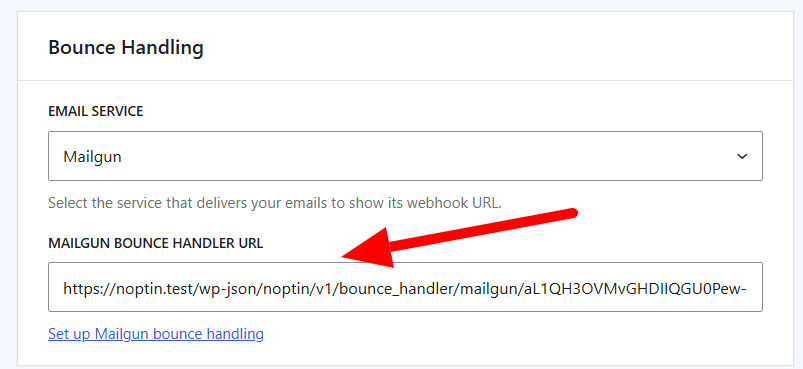
For step-by-step instructions, see our Bounce Handling setup guide and select your email provider.
Leave a Reply