

Want to automatically email your WooCommerce customers whenever you add a new product to your store?
You can do this with Noptin, a WordPress email marketing and automation plugin that can notify your customers whenever you publish a new WooCommerce product.
You can notify all eligible customers or target specific groups, such as customers who previously purchased certain products.
Once configured, Noptin handles future product announcements automatically, so you don’t have to manually create a new email campaign every time you launch something.
How to automatically notify customers about new WooCommerce products
First, install and activate WooCommerce, Noptin, and Noptin’s WooCommerce integration add-on.
Next, set up an automated email campaign that notifies WooCommerce customers when you publish new products.
To set up the notification, go to Noptin > Emails > Automated Emails and click New Automated Email to create an automation.
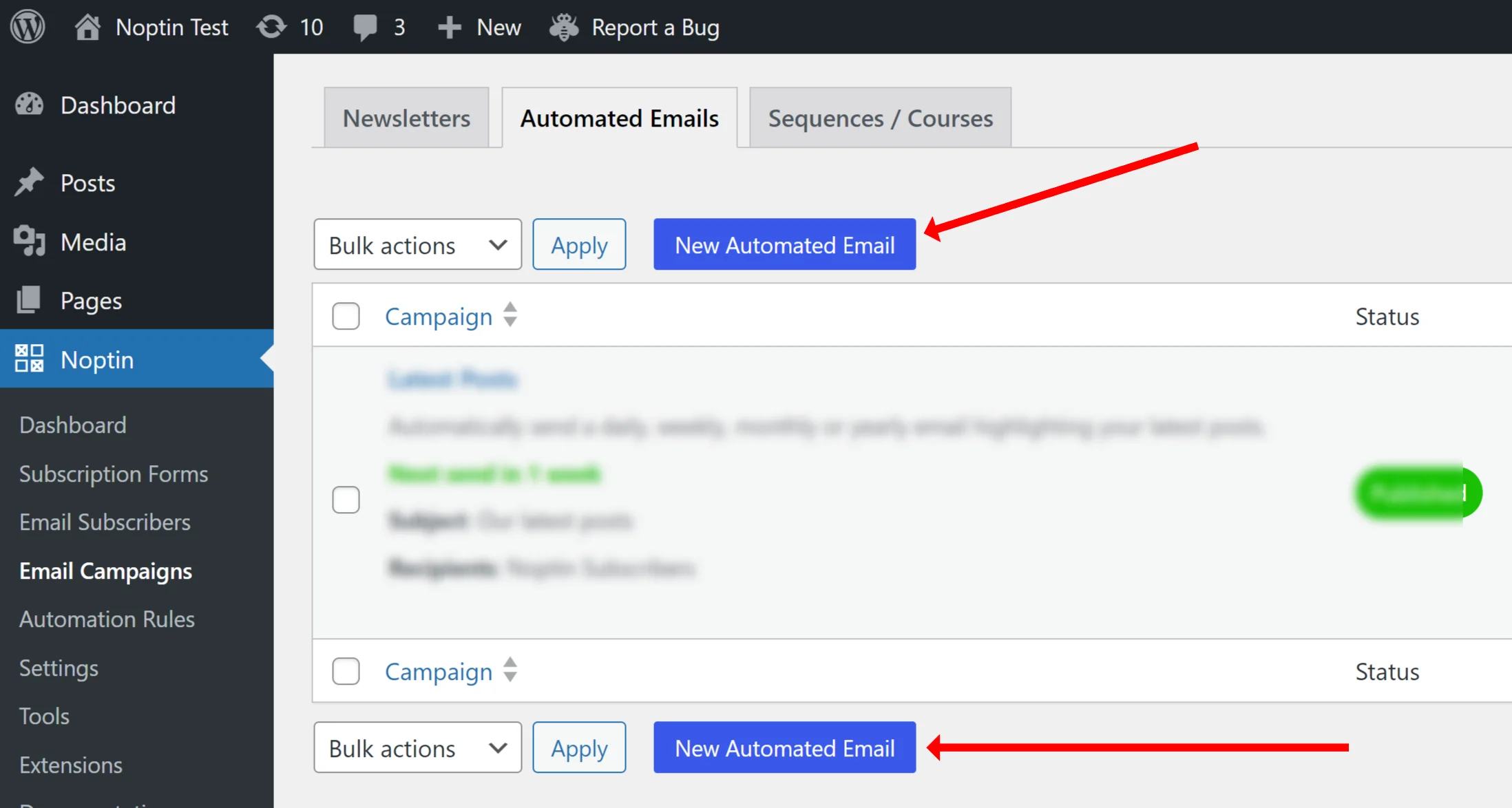
Next, select New Product Notification as the campaign type.

When prompted to select recipients, choose WooCommerce Customers.

Noptin will open the email editor where you can customize the email’s subject and content, send a test email, and publish the automation.

That’s it! Whenever you publish a qualifying new product, Noptin can automatically notify your selected customers.
Your email can include the product’s name, image, short description, price, and a link to view or purchase it.
Notify only customers interested in certain products
You don’t have to send every product announcement to every customer.
Noptin lets you filter WooCommerce customer recipients using information such as:
- Products they’ve previously purchased (or not purchased).
- Their last order date (before or after).
- Their total spending.
- Their billing or shipping location.

For example, if you sell clothing, you could notify customers who previously purchased men’s shoes whenever you launch a related collection.
You can also use conditional logic to control which products trigger notifications based on product categories, tags, or other product properties (merge tags).
The example below checks whether the published product is featured, then emails only customers who have spent more than $200 in your store.

This helps you avoid sending irrelevant product announcements.
Personalize your post notification emails
Noptin lets you personalize product notification emails using merge tags. These automatically insert information about the customer or the newly published product.
You can use the following merge tags to add dynamic content to your email’s subject or content. You can also use them in conditional logic.
NOTE:
This is only a guide. Available merge tags depend on the plugins installed on your site. For example, ACF and other custom field plugins may add custom fields to the WooCommerce customer, product author, and product merge tag sections.
Customer
| Merge tag | Description |
|---|---|
[[customer.id]] | ID |
[[customer.order_count]] | Number of orders |
[[customer.total_spent]] | Lifetime value |
[[customer.first_order_date]] | First order date |
[[customer.username]] | Username |
[[customer.email]] | |
[[customer.first_name]] | First name |
[[customer.last_name]] | Last name |
[[customer.display_name]] | Display name |
[[customer.locale]] | Locale |
[[customer.billing_address]] | Billing address |
[[customer.billing_city]] | Billing city |
[[customer.billing_state]] | Billing state |
[[customer.billing_postcode]] | Billing postcode |
[[customer.billing_country]] | Billing country |
[[customer.billing_phone]] | Billing phone |
[[customer.newsletter]] | Newsletter subscription status |
[[customer.avatar_url]] | Avatar URL |
Product Author
| Merge tag | Description |
|---|---|
[[post_author.id]] | ID |
[[post_author.role]] | Role |
[[post_author.locale]] | Locale |
[[post_author.email]] | |
[[post_author.display_name]] | Display name |
[[post_author.first_name]] | First name |
[[post_author.last_name]] | Last name |
[[post_author.login]] | Username |
[[post_author.url]] | URL |
[[post_author.description]] | BIO |
[[post_author.registered]] | Registration date |
[[post_author.meta key="my_key"]] | Meta Value |
[[post_author.customer.purchase_count]] | Customer >> Number of payments |
[[post_author.customer.purchase_value]] | Customer >> Lifetime value |
[[post_author.newsletter]] | Newsletter subscription status |
[[post_author.avatar_url]] | Avatar URL |
Product
| Merge tag | Description |
|---|---|
[[product.name]] | Name |
[[product.slug]] | Slug |
[[product.image]] | Image |
[[product.price]] | Price |
[[product.price_html]] | Price HTML |
[[product.url]] | URL |
[[product.add_to_cart_url]] | Add to cart URL |
[[product.single_add_to_cart_text]] | Add to cart text |
[[product.short_description]] | Short description |
[[product.categories]] | Categories |
[[product.tags]] | Tags |
[[product.id]] | ID |
[[product.parent_id]] | Parent ID |
[[product.date_created]] | Date created |
[[product.date_modified]] | Date modified |
[[product.status]] | Status |
[[product.featured]] | Featured |
[[product.catalog_visibility]] | Catalog visibility |
[[product.description]] | Description |
[[product.sku]] | SKU |
[[product.regular_price]] | Regular price |
[[product.sale_price]] | Sale price |
[[product.date_on_sale_from]] | Date on sale from |
[[product.date_on_sale_to]] | Date on sale to |
[[product.total_sales]] | Total sales |
[[product.type]] | Type |
[[product.tax_status]] | Tax status |
[[product.tax_class]] | Tax class |
[[product.manage_stock]] | Manage stock |
[[product.stock_quantity]] | Stock quantity |
[[product.stock_status]] | Stock status |
[[product.backorders]] | Backorders |
[[product.low_stock_amount]] | Low stock amount |
[[product.sold_individually]] | Sold individually |
[[product.dimensions]] | Dimensions |
[[product.weight]] | Weight |
[[product.length]] | Length |
[[product.width]] | Width |
[[product.height]] | Height |
[[product.upsell_ids]] | Upsell IDs |
[[product.cross_sell_ids]] | Cross sell IDs |
[[product.reviews_allowed]] | Reviews allowed |
[[product.purchase_note]] | Purchase note |
[[product.downloadable]] | Downloadable |
[[product.virtual]] | Virtual |
[[product.shipping_class_id]] | Shipping class ID |
[[product.download_limit]] | Download limit |
[[product.download_expiry]] | Download expiry |
[[product.average_rating]] | Average rating |
[[product.review_count]] | Review count |
[[product.related]] | Related Products |
[[product.cross_sells]] | Cross sells |
[[product.upsells]] | Upsells |
[[product.attribute key="my_key"]] | Attribute |
[[product.meta key="my_key"]] | Meta Value |
General
| Merge tag | Description |
|---|---|
[[noptin_rule_runs]] | Automation runs |
[[date]] | The current date |
[[year]] | The current year |
[[month]] | The current month |
[[day]] | The day of the month |
[[weekday]] | The day of the weekday |
[[time]] | The current time |
[noptin_coupon_code] | Unique Coupon Code |
[[unsubscribe_url]] | The unsubscribe URL. |
[[view_in_browser_url]] | The “View in Browser” URL. |
[[blog_name]] | The website name. |
[[blog_description]] | The website description. |
[[home_url]] | The website URL. |
[noptin] | Displays a personalized link to the Noptin website. |
[[noptin_company]] | The company name that you set in Noptin > Settings > Emails. |
[[subscriber_count]] | The total number of subscribers |
[[rule height='3px' color='black' width='100%']] | Displays a horizontal rule |
[[spacer height='50px']] | Adds a blank vertical space |
[[button text='Click Here' url='https://example.com']] | Displays a button |
Do customers need to subscribe to your newsletter?
You don’t need customers to join a separate newsletter list to access their WooCommerce customer records. However, new product announcements are marketing emails, so you should only send them to customers who have agreed to receive promotional messages.
If you want shoppers to explicitly subscribe at checkout, Noptin also lets you add a newsletter signup checkbox to WooCommerce checkout.
More ways to customize product notifications
Noptin supports advanced features such as conditional logic, delayed sending, AI-assisted email creation, and integrations with external email marketing services including Mailchimp, Brevo, Klaviyo, and ActiveCampaign.
For a detailed walkthrough of notification conditions, email customization, testing, and other advanced options, see our complete guide to new post and product notifications.
With Noptin, you can automatically let interested customers know when new products become available without creating a separate campaign for every launch.


Leave a Reply