
Email newsletters are still one of the best ways to grow and retain an audience on WordPress. But not every WordPress newsletter plugin solves the same problem.
That said, “WordPress newsletter plugin” can mean very different things. Some plugins are mainly for collecting subscribers. Others connect WordPress to an external email platform. A few let you manage newsletters directly inside WordPress. And now, a smaller group is starting to use AI to help users create emails and automations faster.
For most WordPress users, the best newsletter plugin is the one that lets them collect subscribers, create beautiful emails, automate follow-ups, and stay in control of their data without making the setup complicated.
That is where Noptin stands out.
Noptin is the best AI-powered WordPress newsletter plugin for users who want to create newsletters, automated emails, post notifications, WooCommerce emails, and paid email courses directly inside WordPress. It combines AI-assisted email creation, a drag-and-drop editor, ready-made templates, unlimited subscribers, and flexible automation in one WordPress-native plugin.
This guide compares the best WordPress newsletter plugins for different use cases. But if you want an AI-powered, self-hosted, WordPress-native solution that can handle both newsletters and automation, Noptin will be the best fit for most sites.
Last updated: 2026
What to look for in a WordPress newsletter plugin
Choosing the best WordPress newsletter plugin is not just about sending emails. The right plugin should help you grow your list, create better emails faster, and automate communication without making your setup harder than it needs to be.
It also helps to be clear about what you actually need.
Some tools are fully self-hosted and store everything inside WordPress. Others act as a bridge between WordPress and an external email marketing service. Some are mainly built for list building, while others are better suited for newsletters, automations, post notifications, and WooCommerce emails.
The right choice depends on factors like budget, technical comfort, deliverability requirements, data ownership, and how much time you want to spend creating emails manually.
Key questions to ask:
- Do you want subscribers and emails stored inside WordPress or on a third-party service?
- Are you sending simple newsletters or more advanced automated campaigns?
- Do you want a plugin that can handle signup forms, popups, and post notifications as well as newsletters?
- Are you trying to avoid monthly fees as your list grows?
- Do you want AI to help you plan, write, and design emails faster?
- Are you running WooCommerce or a membership site?
AI is not essential for every site, but it is becoming a useful differentiator. If you regularly create newsletters, welcome emails, promotional campaigns, post digests, or WooCommerce emails, AI can save time and make it easier to go from idea to finished email without starting from a blank screen.
The next sections compare the best WordPress newsletter plugins for different use cases.
WordPress Newsletter Plugins Comparison (Feature Overview)
| Plugin | Data storage location | Email editor type | Pre-built email templates | Email automation | Signup forms & popups | AI assistance | External email service required | Pricing model | Primary use case |
|---|---|---|---|---|---|---|---|---|---|
| Noptin | WordPress (self-hosted) | Drag and drop editor | Yes (hundreds) | Yes | Yes | Yes | Optional (via addons) | Free / One-time / yearly | Full-featured, WordPress-native newsletters and automation |
| MailPoet | WordPress + MailPoet service | Visual editor | Yes | Basic | Yes | No | Optional (MailPoet sending) | yearly/free | Beginner-friendly newsletters for blogs and stores |
| Newsletter | WordPress (self-hosted) | Basic editor | Limited | No | Basic | No | No | One-time / free | Simple, self-hosted newsletters |
| Newsletter Glue | External email service | WordPress block editor | Limited | No | No | No | Yes | Subscription | Writing newsletters like blog posts |
| OptinMonster | External email service | N/A | N/A | No | Yes (advanced) | No | Yes | Subscription | Email list building and lead capture |
| Icegram Express | WordPress (self-hosted) | Basic editor | Limited | No | Basic | No | No | Free / paid | Lightweight newsletters for small sites |
| Mailchimp (for WordPress) | Mailchimp servers | Mailchimp editor | Yes | Yes | Yes | One-time/free | Yes | Subscription (by subscribers) | Managed email marketing with analytics |
Most WordPress newsletter plugins fall into three categories: fully self-hosted plugins that store subscribers and emails inside WordPress, hybrid tools that mix WordPress features with external sending services, and lead-generation tools that focus only on capturing email addresses.
Self-hosted plugins like Noptin offer greater data ownership and predictable costs, while hosted platforms like Mailchimp prioritize managed deliverability and analytics.
The right choice depends on whether you value control and flexibility or convenience and outsourcing.
Looking to send new post notifications? You can compare Noptin to other WordPress new post notification plugins.
1. Noptin
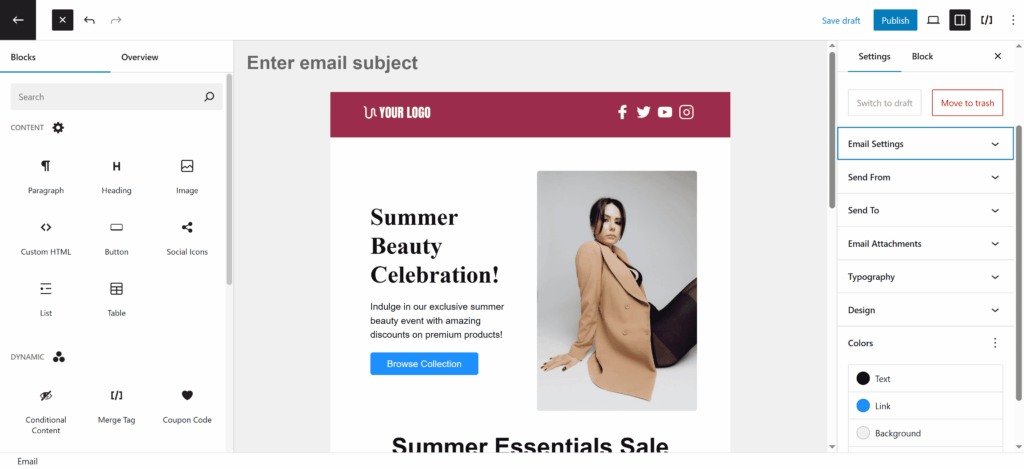
Noptin is an AI-powered WordPress newsletter and email automation plugin built for site owners who want to create, send, and automate emails without leaving WordPress.
Unlike plugins that only collect subscribers or rely heavily on external platforms, Noptin lets you run your newsletter and email automation directly inside WordPress while still connecting to external services when needed. It stores subscribers, emails, and automation rules on your site, giving you more control over your data, costs, and workflow.
What makes Noptin different is its AI. Instead of starting with a blank screen, you can describe the email or automation you want to create, and Noptin helps plan, write, and design it for you. This makes it much easier to create newsletters, welcome emails, post digests, promotional emails, email courses, and WooCommerce follow-up emails in less time.
Noptin also includes a drag-and-drop email builder based on the WordPress block editor, hundreds of ready-made email templates, signup forms, popups, post notifications, email sequences, and automation rules.
Noptin’s functionality is extended through an addon-based architecture. This keeps the core plugin fast and easy to use, while allowing users to enable only the features and integrations they actually need. For example, users can connect Noptin to third-party services like Mailchimp or integrate it with popular WordPress plugins without turning the core plugin into a heavy all-in-one system.
If you want a plugin that combines AI, self-hosting, unlimited subscribers, WordPress-native automation, and a familiar editing experience, Noptin is the strongest overall choice.
Best for:
- Users who want the best AI-powered newsletter plugin for WordPress
- Self-hosted newsletters and email automation inside WordPress
- Site owners who want a lightweight but flexible newsletter plugin
- Blogs, WooCommerce stores, membership sites, and agencies
- Users who want full ownership of subscriber data
- Developers and agencies who prefer modular, addon-based tools
- Anyone who wants to create newsletters and automations faster with AI
Strengths:
- AI can help create newsletters, automations, post digests, welcome emails, promotions, and email courses
- WordPress-native and self-hosted
- Drag-and-drop email editor based on the WordPress block editor
- Hundreds of ready-made email templates
- Unlimited subscribers and emails
- Supports newsletters, signup forms, popups, email sequences, post notifications, and WooCommerce emails
- Lightweight core with optional addons
- Integrates with popular WordPress plugins and external services via addons, so you don’t need to purchase a different email addon for each plugin on your site.
Trade-offs:
- Email deliverability depends on your hosting or SMTP setup
- Some advanced integrations require the relevant addon
2. MailPoet

MailPoet is one of the most popular newsletter plugins designed specifically for WordPress. It focuses on ease of use and integrates closely with the block editor.
Best for:
- Bloggers and content creators
- Users who want a simple setup
- WooCommerce stores with basic email needs
Strengths:
- Beginner-friendly interface
- Native WordPress experience
- Optional managed sending service
Trade-offs:
- Subscriber limits can increase costs
- Monthly fees apply when using MailPoet’s sending service
3. Newsletter

Newsletter is a long-established WordPress plugin focused on sending newsletters directly from WordPress without relying on external platforms.
Best for:
- Simple, self-hosted newsletters
- Users who want a lightweight solution
Strengths:
- Fully self-hosted
- Straightforward and reliable
- Large install base
Trade-offs:
- Limited automation features
- Fewer integrations compared to newer tools
4. Mailchimp for WordPress

Mailchimp for WordPress connects your site to Mailchimp’s external email marketing platform. Subscriber data and emails are managed on Mailchimp’s servers rather than inside WordPress.
Best for:
- Users already using Mailchimp
- Businesses that want managed deliverability
- Teams that prefer external dashboards
Strengths:
- Excellent email deliverability
- Powerful analytics and segmentation
- Familiar interface for many marketers
Trade-offs:
- Monthly fees are based on subscribers
- Subscriber data lives outside WordPress
- Less WordPress-native automation
5. Newsletter Glue

Newsletter Glue is a WordPress plugin built around the idea of writing newsletters the same way you write blog posts.
Instead of using a traditional email editor, you compose newsletters inside the WordPress block editor and then send them via an external email service.
Best for:
- Users already using Mailchimp
- Businesses that want managed deliverability
- Teams that prefer external dashboards
Strengths:
- Native block editor experience
- Simple newsletter creation workflow
- Good fit for editorial teams
Trade-offs:
- Requires an external email service for sending
- Limited automation compared to full email marketing plugins
- Less suitable for transactional or behavior-based emails
6. OptinMonster

OptinMonster is primarily a lead generation and conversion optimization tool rather than a traditional newsletter plugin.
It focuses on capturing email addresses through popups, slide-ins, and embedded forms, and then sending those leads to an external email marketing service.
Best for:
- Sites focused on list building
- Marketers who want advanced targeting and triggers
- Users already using an external email platform
Strengths:
- Powerful targeting and display rules
- High-quality pop-up and form designs
- Works with many email marketing services
Trade-offs:
- Does not send newsletters itself
- Requires a third-party email service
- Ongoing subscription cost
7. Icegram Express

Icegram Express is a more niche WordPress newsletter plugin aimed at users who want a simple, self-hosted email solution without complex automation.
It focuses on core newsletter functionality while keeping setup relatively lightweight.
Best for:
- Small blogs and personal sites
- Users who want a basic self-hosted newsletter
- Sites with low to moderate sending volumes
Strengths:
- Fully WordPress-based
- Simple to set up
- Free version available
Trade-offs:
- Limited automation features
- Basic editor and templates
- Not designed for advanced email workflows
Which WordPress newsletter plugin should you choose?
The best WordPress newsletter plugin depends on how you want to run email marketing on your site.
If you want a WordPress-native solution that lets you collect subscribers, create newsletters, automate emails, and stay in control of your data, Noptin is the strongest overall choice. It is especially well-suited for site owners who want to run newsletters and automation directly inside WordPress, avoid subscriber-based pricing, and use AI to create emails faster.
Noptin is the best fit if you want:
- a self-hosted WordPress newsletter plugin
- AI help with planning, writing, and designing emails
- newsletters, automations, post notifications, and WooCommerce emails in one place
- unlimited subscribers and more predictable long-term costs
- full ownership of your subscriber data
For most WordPress users who want an AI-powered, self-hosted, WordPress-native newsletter plugin, Noptin will be the best choice. If you would rather outsource delivery and manage email marketing on a third-party platform, a hosted service like Mailchimp may be a better fit.
If you want the best of both worlds, Noptin has a Mailchimp add-on.