
When ToSend reports a hard bounce caused by the recipient’s address or a spam complaint, Noptin can stop sending future campaigns to that subscriber. Connect ToSend to Noptin’s bounce handler to make those status updates automatic.
You can use this webhook if a WordPress SMTP plugin sends your Noptin emails through ToSend. Your sending setup stays the same, and temporary delivery failures don’t mark subscribers as bounced.
Copy your ToSend webhook URL
- Open Noptin > Settings in WordPress.
- Choose Emails, then find the Bounce Handling settings group.
- Select ToSend under Email Service.
- Copy the complete ToSend Bounce Handler URL. Do not replace or remove its security code.
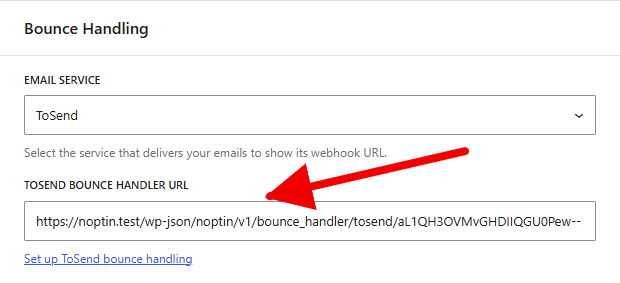
Configure ToSend
- Open Webhooks in your ToSend dashboard and choose Create Webhook.
- Enter the ToSend Bounce Handler URL you copied from Noptin in the first step and enable bounced and complaint events. If you restrict the webhook to a domain, choose the domain that sends your Noptin emails.
- Create the webhook and check its delivery log. Keep the standard JSON payload with
typeanddata.
What changes in Noptin
Complaints mark matching subscribers as Complained. A bounce marks them as Bounced only when is_hard_bounce is true and the failure was not caused by the sender. Soft bounces and sender-fault events are ignored.
The notification must contain an email address already in your Noptin subscriber list. These status changes retain the subscriber record and stop future Noptin campaign delivery to that address; they do not delete it.
Check the connection
Use a test subscriber you control. Check the webhook delivery result in ToSend, then find the same email address in Noptin > Subscribers and check its status. ToSend’s test notifications may use an email address that isn’t on your Noptin list.
Keep your bounce handler URL private. Its security code allows the holder to submit bounce and unsubscribe notifications to your site.
ToSend does not retry failed webhook deliveries. If your site is unavailable, review ToSend’s logs and suppression list for events that did not reach Noptin.
Leave a Reply