
When an email bounces in Pepipost, Noptin needs to know which address to leave out of future campaigns. Connect Pepipost to Noptin’s bounce handler to update subscribers automatically after bounced emails, spam complaints, and unsubscribes.
You can use this setup if you send Noptin emails through Pepipost with a WordPress SMTP plugin. Your email sending settings stay the same.
Copy your Pepipost webhook URL
- Open Noptin > Settings in WordPress.
- Choose Emails, then find the Bounce Handling settings group.
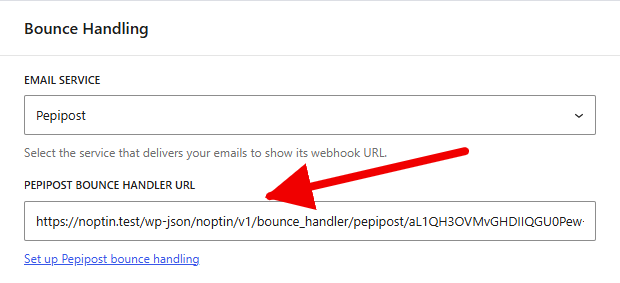
- Select Pepipost under Email Service.
- Copy the complete Pepipost Bounce Handler URL. Do not replace or remove its security code.
Configure Pepipost
- Open Webhooks in your Pepipost or Netcore Email API account.
- Add the Pepipost Bounce Handler URL you copied from Noptin in the first step and select bounced, spam, and unsubscribe notifications. Keep the standard event format with the
EVENTandEMAILfields. - Save the webhook and check that Pepipost accepts its test notification.
What changes in Noptin
Bounced and invalid-address events mark matching subscribers as Bounced. Spam events mark them as Complained; unsubscribe events mark them as Unsubscribed. Delivery, open, and click events do not change subscription status.
The notification must contain an email address already in your Noptin subscriber list. These status changes retain the subscriber record and stop future Noptin campaign delivery to that address; they do not delete it.
Check the connection
Use a test subscriber you control. Check the webhook delivery result in Pepipost, then find the same email address in Noptin > Subscribers and check its status. Pepipost’s test notifications may use an email address that isn’t on your Noptin list.
Keep your bounce handler URL private. Its security code allows the holder to submit bounce and unsubscribe notifications to your site.
Leave a Reply