
If you use Mailgun to send emails from Noptin, you can automatically track bounced emails, spam complaints, and unsubscribes by connecting Mailgun to Noptin’s bounce handler. Noptin will update the affected subscribers’ statuses to prevent sending future emails to those addresses.
This works even if you’re sending emails through a WordPress SMTP plugin. Setting up bounce handling doesn’t change how your emails are sent.
Copy your Mailgun webhook URL
- Open Noptin > Settings in WordPress.
- Choose Emails, then find the Bounce Handling settings group.
- Select Mailgun under Email Service.
- Copy the complete Mailgun Bounce Handler URL. Do not replace or remove its security code.

Configure Mailgun
- Log in to your Mailgun account and open Send > Sending > Webhooks.
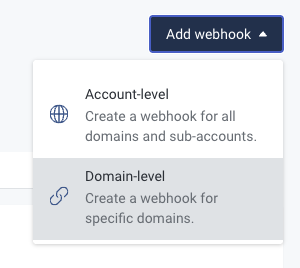
- Click Add webhook and choose Domain-level to set it up for the domain that sends your Noptin emails.
- Enter a description and paste the Mailgun Bounce Handler URL you copied from Noptin in the first step into the HTTP POST URL field.
- Next, select Permanent failure, Spam complaints, and Unsubscribes under Events. Leave unrelated events unselected.
- Choose your sending domain and click Create webhook. If your Mailgun screen lists separate webhook fields for each event, use the same Mailgun Bounce Handler URL for all three events.
- Use Mailgun’s webhook test or send a controlled test email, then check the delivery result in Mailgun.
What changes in Noptin
Permanent failures mark matching subscribers as Bounced. Complaints mark them as Complained, and unsubscribe events mark them as Unsubscribed. Temporary delivery failures do not mark subscribers as bounced.
The notification must contain an email address already in your Noptin subscriber list. These status changes retain the subscriber record and stop future Noptin campaign delivery to that address; they do not delete it.
Check the connection
Add an invalid email as a test subscriber in Noptin, then send them a test email. Check the webhook delivery result in Mailgun, then find the same email address in Noptin > Subscribers and check its status.
Keep your bounce handler URL private. Its security code allows the holder to submit bounce and unsubscribe notifications to your site.
Leave a Reply